
SMS has a 98% open rate compared to email's 20%, and most coaches and consultants are completely ignoring it. They pour money into Facebook Ads, build elaborate email sequences, and wonder why their follow-up feels sluggish. Meanwhile, the fastest-growing service businesses are closing deals through text messages.
GoHighLevel gives you everything you need to run SMS marketing at scale: two-way texting, bulk campaigns, automated sequences, missed call text-back, and full conversation tracking. All inside the same platform where you build funnels, manage contacts, and run your CRM.
This guide breaks down how to set up SMS marketing in GoHighLevel, which campaigns to run first, the automations that save hours per week, and the compliance rules you need to follow to keep your number active.
Why SMS Marketing Works for Coaches and Consultants
Email is not dead, but it is crowded. The average professional receives 120+ emails per day. Your carefully crafted nurture sequence is competing with newsletters, promotions, and spam. Even a great email only gets opened 20% to 25% of the time.
Text messages live in a different universe. They get opened within three minutes on average. The reply rate on SMS is 45% compared to email's 6%. For service-based businesses where the sale depends on getting a conversation started, that difference is everything.
“Email is where information goes to wait. SMS is where conversations happen right now.”
Here is what makes SMS particularly effective for coaches and consultants:
Speed to Lead
Research from InsideSales shows that responding to a lead within five minutes makes you 21x more likely to qualify them compared to waiting 30 minutes. SMS lets you hit that window automatically. When someone fills out your form, they can receive a personalized text within seconds.
Appointment Show Rates
SMS reminders are the single most effective tactic for reducing no-shows. Coaches who add text reminders to their booking process see show rates jump by 15% to 25%. A simple text the morning of the call ("Looking forward to our chat at 2pm today, [name]!") costs almost nothing and directly impacts revenue.
Re-Engagement
Leads that go cold on email often respond to text. A well-timed "Hey [name], still thinking about [topic from their opt-in]?" sent via SMS pulls people back into the conversation who were never going to open your seventh follow-up email.
Personal Feel
Text messaging feels personal in a way email never will. When a prospect gets a text from you, it lands in the same app where they talk to friends and family. This creates a conversational dynamic that is much harder to achieve through email alone.
Setting Up SMS in GoHighLevel
Before you send your first text, you need a few things configured properly.
Step 1: Register Your Phone Number
GoHighLevel uses Twilio or Lead Connector (LC Phone) for SMS delivery. When you set up your sub-account, you will need to register a phone number. You have two options:
- Local number: Best for businesses that serve a specific geographic area. Feels personal and local.
- Toll-free number: Better for national businesses. Higher throughput for bulk messaging.
Navigate to Settings > Phone Numbers in your sub-account and either purchase a new number or port an existing one.
Step 2: A2P 10DLC Registration (Required for US Numbers)
If you are texting US numbers, you must complete A2P (Application-to-Person) 10DLC registration. This is not optional. Carriers like AT&T, T-Mobile, and Verizon now require it, and unregistered numbers face heavy filtering or outright blocking.
The registration process inside GoHighLevel:
- Go to Settings > Phone Numbers > Trust Center
- Register your business (EIN, business name, address)
- Create a campaign describing your use case
- Submit and wait for approval (typically 1 to 5 business days)
This step is boring but critical. Skip it and your messages will not reach your audience.
Step 3: Set Up Opt-In Compliance
You need explicit consent before texting anyone. This means:
- Forms and funnels: Add SMS consent language to every form. Something like: "By providing your phone number, you consent to receive text messages from [Business Name]. Message and data rates may apply. Reply STOP to unsubscribe."
- Keyword opt-in: Set up a keyword (like "COACH") that people can text to your number to opt in.
- Double opt-in (recommended for bulk): Send a confirmation text asking the contact to reply YES before adding them to campaigns.
GoHighLevel handles STOP and HELP keyword responses automatically, which keeps you compliant with TCPA regulations.
“Compliance is not a suggestion. One complaint from an unsubscribed contact can get your number flagged and your messages blocked across all carriers.”
The Five SMS Campaigns Every Coach Should Run
You do not need 20 different text campaigns. Start with these five and you will cover 90% of your SMS marketing needs.
Campaign 1: Speed-to-Lead Auto-Response
What it does: Sends an instant text when someone fills out a form or opts in.
Why it works: The lead is at peak interest the moment they take action. Hitting them with a text within seconds keeps the momentum going and starts a two-way conversation.
Example sequence:
Immediately after opt-in:
"Hey [first name], this is [your name] from [business]. Got your request. Quick question: what's the #1 thing you're looking to solve right now?"
If no reply after 10 minutes:
"No rush, [first name]. Just want to make sure I can point you in the right direction. What's your biggest challenge with [topic]?"
This two-message sequence alone generates more replies than most five-email nurture sequences. The key is asking an open-ended question that requires a real answer, not just sending a link.
Campaign 2: Appointment Reminders
What it does: Sends text reminders before scheduled calls.
Why it works: No-shows are the silent killer of coaching revenue. A three-touch reminder sequence cuts no-show rates dramatically.
Example sequence:
24 hours before: "Quick reminder: we have a call tomorrow at [time]. Here's the Zoom link: [link]. Looking forward to it!"
1 hour before: "See you in an hour, [first name]! Make sure you're somewhere quiet with good wifi. Here's the link: [link]"
5 minutes before: "Jumping on now. See you in there! [link]"
Set this up once in GoHighLevel's workflow builder and it runs forever. Every single call gets three reminders without you lifting a finger.
Campaign 3: No-Show Recovery
What it does: Reaches out to leads who missed their appointment.
Why it works: Most no-shows are not rejections. They forgot, something came up, or they got nervous. A friendly follow-up text recovers 20% to 30% of no-shows.
Example sequence:
15 minutes after missed call: "Hey [first name], looks like we missed each other today. No worries at all. Want to grab another time? [booking link]"
24 hours later: "Still have a spot open this week if you want to rebook, [first name]. [booking link]"
72 hours later (if no response): "[first name], I know things get busy. If now's not the right time, totally fine. But if you're still looking to [solve their problem], grab a time here and let's chat: [booking link]"
Notice the tone: zero guilt, zero pressure. People respond to texts that feel like they are from a human, not a sales machine.
“A no-show is not a lost deal. It is an opportunity to demonstrate that you actually care enough to follow up.”
Campaign 4: Post-Call Follow-Up
What it does: Sends a text after a discovery call to keep the conversation moving.
Why it works: The gap between "great call" and "signed client" is where most deals die. A timely text bridges that gap.
Example sequence:
Immediately after call (manual or triggered by disposition tag):
"Great chatting with you, [first name]. I'll send over the details we discussed within the hour. Any questions in the meantime, just text me back here."
48 hours later (if no response to proposal):
"Hey [first name], wanted to check in. Did you get a chance to review everything? Happy to jump on a quick call if you have questions."
5 days later (if still no response):
"[first name], just want to make sure this didn't get buried in your inbox. Here's the link again: [proposal link]. Let me know either way so I can free up the spot if needed."
That last line creates subtle urgency without being pushy. "Free up the spot" implies scarcity without fabricating it.
Campaign 5: Re-Engagement for Cold Leads
What it does: Reaches out to contacts who have gone silent for 30+ days.
Why it works: People's circumstances change. The lead who could not afford coaching two months ago might have just landed a new client. A well-timed text re-opens the door.
Example messages (send ONE, not a sequence):
- "Hey [first name], [your name] here. Been a while since we chatted. Still working on [their goal]? I've got a few ideas that might help."
- "[first name], I just put together a free [resource] that I think you'd find useful. Want me to send it over?"
- "Quick question, [first name]: are you still looking to [solve problem]? I've opened up a few spots this month."
Re-engagement texts work best as one-off messages, not automated sequences. Send them manually or in small batches to contacts tagged as "cold" in your CRM.
Building SMS Workflows in GoHighLevel
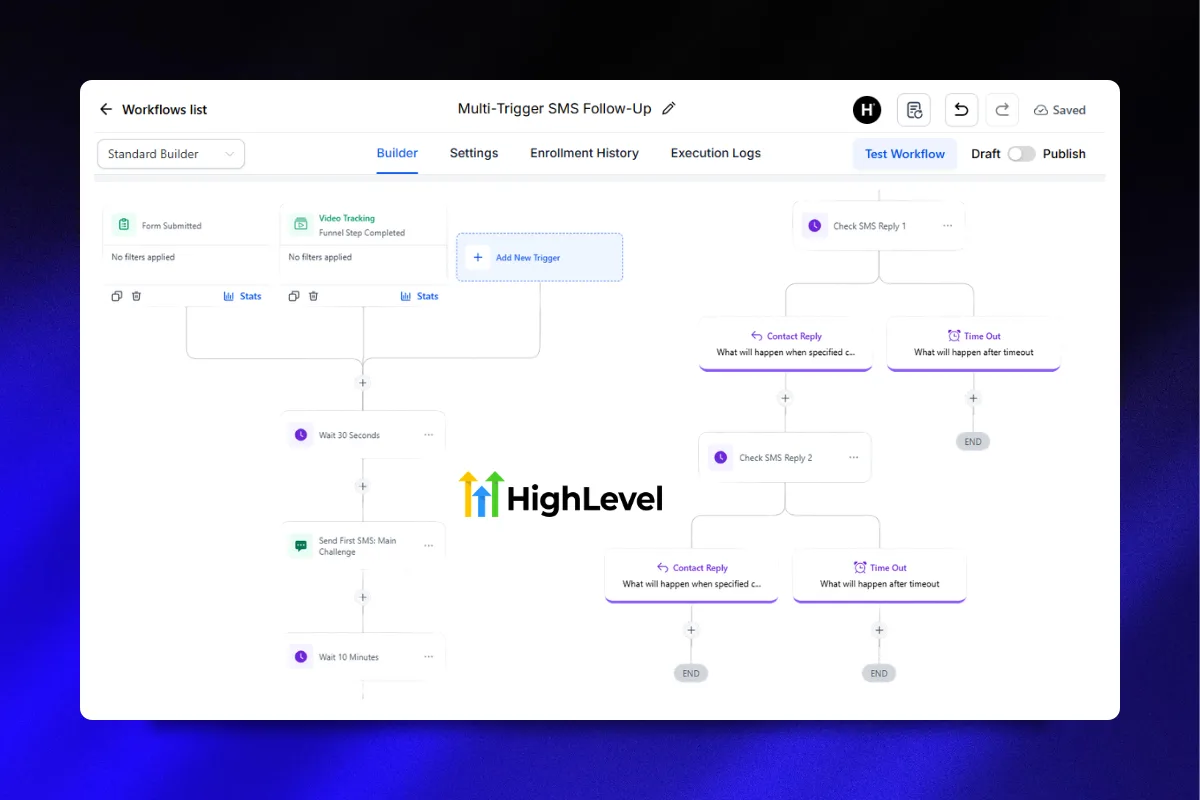
Now let us get into the technical setup. GoHighLevel's workflow builder is where all of this comes together.
Workflow Structure for SMS
Every SMS workflow follows the same basic pattern:
- Trigger (what starts it)
- Wait (timing between messages)
- Send SMS (the actual text)
- Condition (check if they replied, booked, etc.)
- Branch (different paths based on what happened)
Building the Speed-to-Lead Workflow
Here is the exact setup:
Trigger: Contact form submitted (or funnel step completed)
Step 1: Wait 30 seconds (gives the system time to process the contact)
Step 2: Send SMS
- Message: "Hey {{contact.first_name}}, this is [Your Name] from [Business]. Got your request. Quick question: what's the #1 thing you're looking to solve right now?"
Step 3: Wait 10 minutes
Step 4: If/Else condition: "Has the contact replied to any SMS?"
- Yes: End workflow (you will reply manually in the conversations tab)
- No: Continue to Step 5
Step 5: Send SMS
- Message: "No rush, {{contact.first_name}}. Just want to make sure I can point you in the right direction. What's your biggest challenge with [topic]?"
Step 6: Wait 24 hours
Step 7: If/Else condition: "Has the contact replied?"
- Yes: End workflow
- No: Send final SMS or switch to email sequence
Building the Appointment Reminder Workflow
Trigger: Appointment scheduled (calendar event)
Step 1: Wait until 24 hours before appointment
Step 2: Send SMS
- Message: "Quick reminder: we've got a call tomorrow at {{appointment.starttime}}. Here's the link: {{appointment.meetinglocation}}. Looking forward to it!"
Step 3: Wait until 1 hour before appointment
Step 4: Send SMS
- Message: "See you in an hour, {{contact.firstname}}! Make sure you're somewhere quiet. Link: {{appointment.meetinglocation}}"
Step 5: Wait until 5 minutes before appointment
Step 6: Send SMS
- Message: "Jumping on now. See you in there! {{appointment.meeting_location}}"
Using the Missed Call Text-Back Feature
One of GoHighLevel's most underrated features is Missed Call Text-Back. When someone calls your business number and you do not answer, the system automatically sends them a text.
To set it up:
- Go to Settings > Business Profile > Missed Call Text Back
- Toggle it on
- Customize the message: "Hey, sorry I missed your call! I'm with a client right now. Can you shoot me a quick text about what you need and I'll get back to you ASAP?"
This converts missed calls into text conversations, which are easier to manage and respond to on your own schedule. For solo coaches who cannot answer the phone during sessions, this is a must.
“Every missed call without a text-back is a lead that probably called your competitor next.”
SMS Compliance: What You Need to Know
SMS marketing is heavily regulated. Violating compliance rules can result in fines, number suspension, and carrier blocking. Here is what you need to follow.
TCPA (Telephone Consumer Protection Act)
The big one for US businesses:
- Written consent required before sending marketing texts
- Clear opt-out mechanism (STOP keyword, which GoHighLevel handles automatically)
- No texting before 8am or after 9pm in the recipient's local time zone
- Identify yourself in every message (your business name)
A2P 10DLC Requirements
As mentioned in the setup section, all businesses sending SMS through US 10-digit local numbers must register with The Campaign Registry (TCR). GoHighLevel walks you through this in the Trust Center.
Canada (CASL) and International
If you text Canadian numbers, you need express consent under CASL (Canada's Anti-Spam Legislation). For other countries, research local regulations before sending. GoHighLevel supports international numbers but compliance responsibility falls on you.
Practical Compliance Checklist
- Every form includes SMS consent language
- Opt-out is easy and automatic (STOP keyword works)
- You only text contacts who have explicitly opted in
- Messages identify your business
- You respect quiet hours (8am to 9pm local time)
- A2P 10DLC registration is complete (for US numbers)
- You keep records of when and how each contact opted in
SMS vs. Email: When to Use Which
SMS and email are not competitors. They serve different roles in your marketing stack.
| Factor | SMS | Email |
|--------|-----|-------|
| Open rate | 98% | 20-25% |
| Reply rate | 45% | 6% |
| Best for | Urgency, reminders, conversations | Long-form content, nurture, education |
| Frequency | 2-4 per week max | Daily acceptable |
| Cost | $0.01-0.05 per message | Included in most plans |
| Unsubscribe risk | Higher if overused | Lower tolerance for volume |
Use SMS for:
- Speed-to-lead responses
- Appointment reminders
- No-show follow-up
- Quick check-ins
- Time-sensitive offers
Use email for:
- Educational content
- Case studies and testimonials
- Long nurture sequences
- Weekly newsletters
- Detailed proposals
The winning strategy is both. Use email for education and relationship building, then use SMS to drive action at critical moments.
“Email builds the relationship. SMS closes the gap. Use both, but never treat them as interchangeable.”
Measuring SMS Campaign Performance
Track these metrics to know if your SMS marketing is working:
Delivery Rate
What percentage of your texts actually reach the recipient? Anything below 95% indicates a problem with your number registration, carrier filtering, or list quality. GoHighLevel shows delivery status for each message in the conversations tab.
Response Rate
What percentage of recipients reply? For conversational texts (like speed-to-lead), aim for 25% to 40%. For reminder texts, a low reply rate is fine since the goal is attendance, not conversation.
Opt-Out Rate
What percentage of recipients text STOP? If more than 3% of recipients opt out from a single campaign, your messaging is too aggressive or off-target. Healthy opt-out rates are under 1% per campaign.
Conversion Rate
The ultimate metric: how many SMS conversations turn into booked calls, showed appointments, or closed deals? Track this by comparing the number of texts sent to the number of desired actions taken.
Cost Per Conversion
SMS costs money per message (typically $0.01 to $0.05 via GoHighLevel's LC Phone). Calculate your cost per booked call or cost per client acquired through SMS to ensure the ROI makes sense. For most coaches, even a $500 SMS bill producing one $3,000 client is a 6x return.
Advanced SMS Strategies
Once your basic campaigns are running, these strategies take it further.
Segmented Campaigns by Lead Source
Not all leads should get the same texts. Someone from a Facebook Ad has different awareness than someone who found you through a Google search. Use GoHighLevel tags and custom fields to segment your SMS campaigns:
- Ad leads: More education-focused texts, build trust before asking for calls
- Organic leads: Already warmer, move faster toward booking
- Referral leads: Highest intent, skip the nurture and go straight to scheduling
Conversational AI + SMS
GoHighLevel's Conversation AI feature can handle initial SMS conversations automatically. It can answer FAQs, qualify leads, and book appointments without human intervention. This is particularly powerful for high-volume lead gen where you cannot personally respond to every text.
Set it up under Settings > Conversation AI and configure it to handle common questions while flagging complex inquiries for human follow-up.
Bulk SMS for Offers and Events
When you launch a new program, host a webinar, or run a limited-time offer, bulk SMS to your opted-in list generates immediate response. In GoHighLevel:
- Go to Marketing > Bulk Actions
- Select your segment
- Compose your message (keep it under 160 characters for single-segment delivery)
- Schedule or send immediately
Keep bulk campaigns rare (once or twice per month max) to avoid burning out your list.
Common SMS Marketing Mistakes
Texting Without Consent
This is the fastest way to get your number flagged. Every contact must have explicitly opted in. Buying SMS lists or texting people who only gave you an email is a compliance violation.
Over-Texting
More is not better with SMS. Two to four texts per week is the maximum for most audiences. Go beyond that and your opt-out rate will spike. Each text should have a clear purpose and provide value.
Being Too Formal
SMS is a casual medium. Write like you are texting a friend, not drafting a business letter. Drop the "Dear valued customer" and use first names, contractions, and short sentences.
No Clear Next Step
Every text should make it obvious what the reader should do next. Reply with a specific answer? Click a link? Book a call? If the text does not have a clear action, it is just noise.
Ignoring Replies
Two-way texting means people will reply. If you send a text asking a question and then take 12 hours to respond, you have destroyed the advantage SMS gives you. Set up notifications in GoHighLevel so you see replies immediately, or use Conversation AI to handle initial responses.
“SMS only works if you treat it like a conversation, not a broadcast channel.”
Getting Started With Pre-Built SMS Automations
Setting up SMS workflows, reminder sequences, and follow-up campaigns from scratch takes time. If you want a head start, the High Ticket OS includes pre-built SMS sequences for appointment reminders, no-show recovery, and post-call follow-up. Import the snapshot and your SMS automations are live in minutes.
For coaches building lead generation funnels with built-in SMS opt-in and nurture, the Lead Magnet OS includes everything from the opt-in page to the text follow-up sequence.
FAQ
How much does SMS marketing cost in GoHighLevel?
GoHighLevel uses LC Phone (Lead Connector) or Twilio for SMS delivery. Costs are typically $0.01 to $0.05 per outbound text message depending on the destination and message type. There is no monthly SMS fee beyond the per-message cost. Most coaches spend $50 to $200 per month on SMS depending on volume.
Do I need a separate phone number for SMS marketing?
Yes. You need a registered phone number inside GoHighLevel to send SMS. You can purchase a local or toll-free number directly through the platform. Using your personal cell phone is not recommended because it does not integrate with automations, tracking, or compliance features.
What is A2P 10DLC and do I need it?
A2P 10DLC (Application-to-Person 10-Digit Long Code) is a registration requirement for businesses sending text messages through standard US phone numbers. It is mandatory. Without registration, carriers like AT&T and T-Mobile will filter or block your messages. Complete this in GoHighLevel under Settings > Phone Numbers > Trust Center.
How do I avoid getting my number flagged as spam?
Register for A2P 10DLC, only text contacts who have opted in, respect quiet hours (8am to 9pm local time), include your business name in messages, keep opt-out rates below 3%, and avoid sending bulk messages too frequently. GoHighLevel handles STOP keyword compliance automatically.
Can I send images or links via SMS in GoHighLevel?
Yes. GoHighLevel supports MMS (multimedia messaging) which allows you to send images, GIFs, and links. MMS messages cost slightly more than standard SMS. Keep in mind that MMS messages with images may not display well on all devices, so always include your key message in the text itself.
What is the missed call text-back feature?
When someone calls your GoHighLevel number and you do not answer, the system automatically sends them a customizable text message. This converts missed calls into text conversations. Set it up under Settings > Business Profile > Missed Call Text Back. It is one of the highest-ROI features in the platform.
How many texts should I send per week?
Two to four texts per week is the recommended maximum for most audiences. This includes automated reminders, follow-ups, and any bulk campaigns. Going beyond this threshold significantly increases opt-out rates. Quality over quantity always wins with SMS.
Can I use SMS for international contacts?
Yes. GoHighLevel supports international SMS through Twilio. However, costs vary significantly by country, and compliance requirements differ. Research local regulations (like GDPR in Europe or CASL in Canada) before texting international contacts. Some countries require stricter opt-in procedures than the US.
Ready to add SMS marketing to your coaching business without building everything from scratch? Grab the High Ticket OS and get pre-built text automations, reminder sequences, and follow-up workflows installed in your GoHighLevel account today.