
If you're still manually coordinating discovery calls through email threads and DM ping-pong, you're leaving money on the table and burning hours you'll never get back. The coaches and consultants who consistently close high-ticket deals have one thing in common: their booking process runs on autopilot.
GoHighLevel's built-in calendar and funnel builder make it possible to build a complete discovery call booking system without touching a single line of code. From the moment a lead lands on your page to the moment they show up on Zoom, every step can be automated: the booking, the confirmation, the reminders, even the follow-up if they no-show.
This guide walks you through the entire process. By the end, you'll have a fully automated booking funnel that qualifies leads, schedules calls, sends reminders, and follows up with no-shows. All inside GoHighLevel.
Why Discovery Call Funnels Matter for High-Ticket Sales
Discovery calls are the lifeblood of high-ticket businesses. Whether you're selling $3,000 coaching packages or $10,000 consulting engagements, the call is where deals happen. But the process around booking those calls is where most businesses hemorrhage leads.
Here's what typically goes wrong:
- A lead fills out a contact form
- You email them back (hours later, sometimes days)
- They respond with availability
- You go back and forth trying to find a time
- By the time you settle on a slot, they've already booked with someone else
Every hour of delay between "I'm interested" and "I'm on the call" reduces your close rate. Studies consistently show that responding to leads within five minutes makes you 21x more likely to qualify them compared to waiting 30 minutes.
“Every hour of delay between "I'm interested" and "I'm on the call" reduces your close rate.”
An automated booking funnel eliminates this entirely. The lead sees your offer, qualifies themselves through your funnel, picks a time that works for both of you, and gets confirmed instantly. No human intervention required until you show up to the actual call.
The Anatomy of a High-Converting Booking Funnel
Before we get into the build, let's map out what a complete booking funnel looks like. There are five core components:
1. The Landing Page
This is where traffic arrives. Whether you're running Facebook ads, posting on LinkedIn, or sending email campaigns, every path leads here. The landing page has one job: convince the visitor that a discovery call with you is worth their time.
A high-converting discovery call landing page includes:
- A clear headline that speaks to the prospect's pain point
- Social proof (testimonials, logos, results)
- A brief description of what the call covers
- An embedded calendar widget or a CTA button that scrolls to the booking section
Keep it focused. No navigation menu, no sidebar, no distractions. One page, one action.
2. The Qualification Form
Not every lead deserves 30 minutes of your time. A qualification form sits between the landing page and the calendar, filtering out tire-kickers and ensuring you only speak with prospects who are actually a fit.
Good qualification questions include:
- What's your current revenue or business stage?
- What's the biggest challenge you're facing right now?
- What's your budget for solving this problem?
- How soon are you looking to get started?
In GoHighLevel, you can build this as a survey or a custom form that feeds directly into your CRM pipeline.
3. The Calendar
GoHighLevel's calendar system connects to your Google Calendar or Outlook, shows your real availability, and lets prospects book directly. You set your available hours, buffer times between calls, and minimum scheduling notice.
4. Confirmation and Reminders
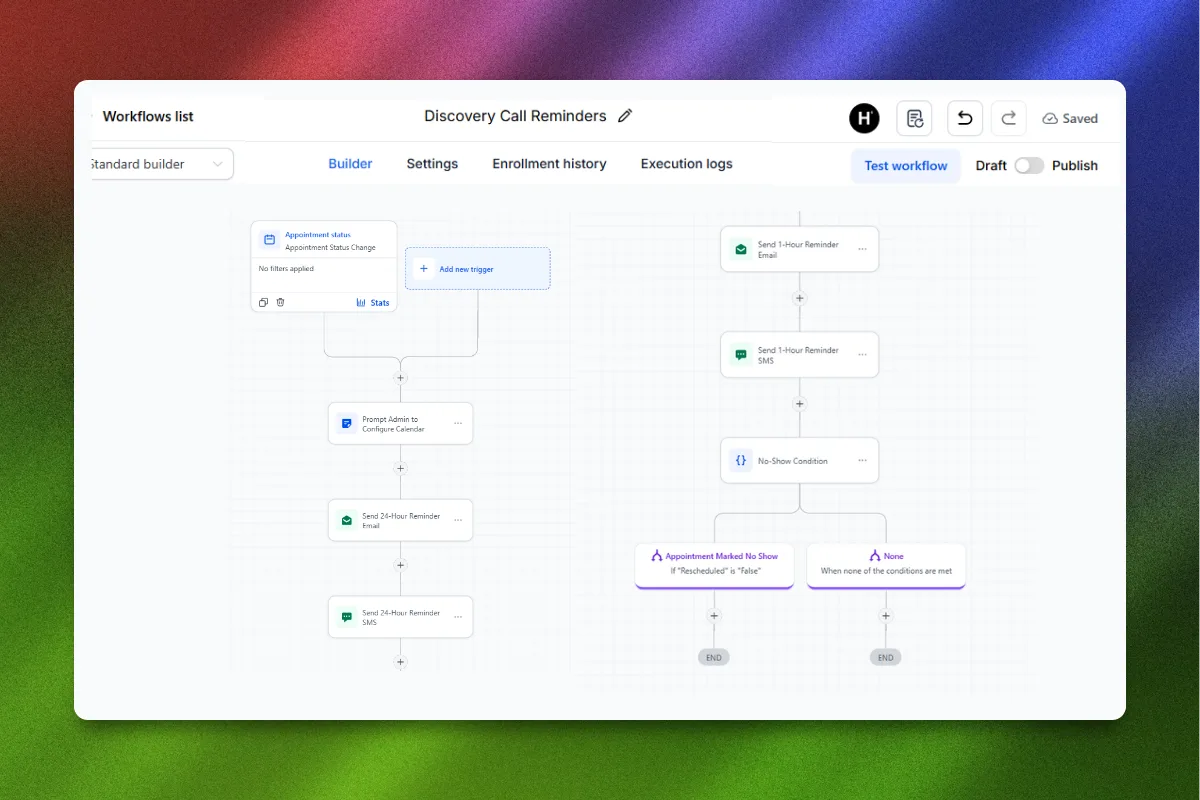
Once someone books, automation takes over. They get an immediate confirmation email, a calendar invite, and a series of reminders leading up to the call. The typical reminder sequence:
- Immediately: Confirmation email + calendar invite
- 24 hours before: Email reminder with call details
- 1 hour before: SMS reminder
- 15 minutes before: Final SMS nudge
5. No-Show Follow-Up
About 20-30% of discovery call bookings result in no-shows. Without follow-up automation, those leads are gone forever. A good no-show sequence re-engages them within hours and offers a chance to rebook.
“About 20-30% of discovery call bookings result in no-shows. Without follow-up automation, those leads are gone forever.”
Step-by-Step: Building Your Booking Funnel in GoHighLevel
Now let's build this thing. I'm going to walk through each step using GoHighLevel's native tools.
Step 1: Set Up Your Calendar
Navigate to Calendars in your GoHighLevel sub-account. Click Create Calendar and choose the type that fits your use case. For discovery calls, the "Simple Calendar" works perfectly.
Configure these settings:
- Appointment Title: Discovery Call with [Your Name]
- Duration: 30 minutes (or 15 if you prefer shorter qualification calls)
- Availability: Set your working hours. Be specific. If you only take calls Tuesday through Thursday, 10 AM to 4 PM, set that.
- Buffer Time: Add 15 minutes between appointments so you're not back-to-back
- Minimum Scheduling Notice: At least 24 hours. This prevents same-day bookings that catch you off guard.
- Date Range: Show availability 14 days out. Long enough to find a slot, short enough to create urgency.
Connect your Google Calendar to avoid double-bookings. GoHighLevel will check your personal calendar before showing available slots.
Custom Fields: Add custom fields to capture information during booking. This is where you put your qualification questions. Name, email, phone number are standard. Add dropdowns or text fields for business stage, revenue, and goals.
Step 2: Build Your Funnel
Go to Sites > Funnels and create a new funnel. You can start from scratch or use a template. For a discovery call funnel, you need two pages minimum:
Page 1: The Landing Page
Use GoHighLevel's drag-and-drop builder to create your landing page. Structure it like this:
- Hero Section: Headline, subheadline, and a CTA button ("Book Your Free Discovery Call")
- Problem Section: 3-4 bullet points describing the prospect's current pain
- Solution Section: Brief overview of how you help
- Social Proof: Testimonials, case studies, or client logos
- Calendar Section: Embed your calendar widget directly on the page using the Calendar element
If you'd rather keep the landing page clean and send people to a separate booking page, add a second funnel step.
Page 2: Thank You Page
After someone books, redirect them to a thank you page that:
- Confirms the booking
- Tells them what to expect on the call
- Asks them to complete any pre-call homework (optional)
- Includes a link to reschedule if needed
The High Ticket OS gives you a complete discovery call funnel template that's already built with these elements. Just customize the copy and connect your calendar.
“The best funnels don't just collect bookings. They pre-sell the prospect on why showing up matters.”
Step 3: Create Your Automation Workflow
This is where GoHighLevel really shines. Go to Automation > Workflows and create a new workflow.
Trigger: Calendar > Appointment Status > Booked
Once triggered, here's the sequence:
Immediate Actions:
- Send confirmation email (include date, time, Zoom link, and what to prepare)
- Send confirmation SMS ("Your discovery call is confirmed for [date] at [time]. See you there!")
- Add contact to pipeline (move to "Booked" stage)
- Add tag: "Discovery Call Booked"
24 Hours Before:
- Wait until 24 hours before appointment
- Send reminder email ("Looking forward to our call tomorrow at [time]")
1 Hour Before:
- Send SMS reminder ("Quick reminder: we're meeting in 1 hour. Here's the link: [Zoom URL]")
15 Minutes Before:
- Send final SMS ("Starting in 15 minutes! Join here: [Zoom URL]")
Step 4: Build the No-Show Recovery Workflow
Create a second workflow triggered by: Calendar > Appointment Status > No Show
No-Show Sequence:
- Wait 30 minutes after missed appointment
- Send email: "I noticed we missed each other today. No worries, life happens. Here's a link to rebook: [calendar link]"
- Send SMS: "Hey [First Name], looks like we missed our call. Want to rebook? [calendar link]"
- Wait 24 hours
- If no response: Send follow-up email with a slightly different angle
- Wait 48 hours
- If still no response: Final attempt with urgency ("I have limited availability next week, but I saved a spot for you")
- If still no response: Move to nurture pipeline
This sequence alone can recover 30-40% of no-shows. That's revenue you would have lost completely without automation.
“A well-built no-show recovery sequence can save 30-40% of lost appointments. That's revenue most businesses just leave on the table.”
Step 5: Connect Your Pipeline
Go to Opportunities > Pipelines and create a pipeline that tracks each lead through the booking process:
- New Lead - They've entered your funnel
- Qualified - They've completed the qualification form
- Booked - Discovery call is scheduled
- Showed - They attended the call
- Proposal Sent - You've sent a proposal or offer
- Won - They signed up
- Lost - They declined or went dark
Your automation workflows should move contacts through these stages automatically. When someone books, they move to "Booked." When the call happens, you manually move them to "Showed" and then to "Proposal Sent" or "Won."
This gives you a bird's-eye view of your sales pipeline at all times.
Step 6: Optimize for Show-Up Rate
Booking a call is only half the battle. Getting people to actually show up is the other half. Here are proven tactics to boost show-up rates:
Pre-call video: After booking, redirect to a thank you page with a 2-3 minute video. Introduce yourself, explain what happens on the call, and tell them to come prepared. This builds rapport before you ever speak.
Homework assignment: Give them something small to complete before the call. "Before we meet, write down your three biggest challenges and your ideal outcome." This increases investment and commitment.
Multiple reminders: The reminder sequence we built above is critical. SMS reminders outperform email for show-up rates because people actually see them.
Calendar invite: Always include a Google Calendar or iCal invite. If it's not on their calendar, it doesn't exist.
Short scheduling window: Show availability only 7-14 days out. The longer the gap between booking and the actual call, the higher the no-show rate.
Advanced Automation: Multi-Channel Follow-Up
Once you have the basics running, layer in additional channels for even higher conversion rates.
SMS + Email Combo
GoHighLevel handles both SMS and email natively. Use email for detailed information (confirmation, prep materials) and SMS for time-sensitive nudges (reminders, rebook links). The combination consistently outperforms either channel alone.
Voicemail Drops
GoHighLevel's voicemail drop feature lets you pre-record a voicemail and automatically deliver it to the prospect's phone without ringing it. Use this as a personal touch 24 hours before the call:
"Hey [Name], it's [Your Name]. Just wanted to personally confirm our call tomorrow. Looking forward to chatting about [their challenge]. Talk soon."
This feels personal even though it's fully automated.
Facebook and Instagram DM Automation
If your leads come from social media, you can trigger DM follow-ups through GoHighLevel's social media integration. When someone books, automatically send a DM acknowledging the booking and offering to answer any pre-call questions.
“The businesses that win aren't necessarily better at what they do. They're better at making sure prospects actually show up.”
Common Mistakes to Avoid
1. Too Many Form Fields
Every additional form field reduces completion rates. Stick to 4-6 qualification questions maximum. You can gather more information on the actual call.
2. No Mobile Optimization
Over 60% of funnel traffic comes from mobile devices. If your booking page doesn't look perfect on a phone, you're losing the majority of your leads. Always preview your funnel on mobile before publishing.
3. Weak Confirmation Page
The thank you page is prime real estate. Don't waste it with a generic "Thanks for booking" message. Use it to pre-sell the call, set expectations, and build excitement.
4. Ignoring No-Shows
If you don't have a no-show recovery workflow, you're accepting a 20-30% loss rate as inevitable. It's not. Build the automation and recover those leads.
5. Not Tracking Metrics
GoHighLevel's reporting dashboard shows you booking rates, show-up rates, and pipeline conversion. Check these weekly. If your show-up rate drops below 70%, your reminder sequence needs work. If your booking rate is low, your landing page copy needs improvement.
Measuring Success: Key Metrics to Track
Your booking funnel generates valuable data. Here are the numbers that matter:
- Booking Rate: Percentage of landing page visitors who book a call. Target: 15-30%
- Show-Up Rate: Percentage of booked calls that actually happen. Target: 70-85%
- Close Rate: Percentage of completed calls that convert to clients. Target: 20-40%
- Cost Per Booking: If running ads, how much each booked call costs. Varies by niche.
- Revenue Per Call: Total revenue divided by total calls. This tells you the true value of each booking.
Track these in GoHighLevel's reporting dashboard or export to a spreadsheet for deeper analysis.
“What you measure improves. What you ignore stays broken.”
Real-World Example: Coaching Business Booking Funnel
Let's look at how this works in practice. A business coach selling a $5,000 group coaching program sets up the following:
- Facebook ads drive traffic to a discovery call landing page
- Landing page includes testimonials from past clients and an embedded calendar
- Qualification survey filters for coaches making at least $50K/year
- Automated confirmation and reminder sequence fires on booking
- No-show recovery sequence runs for anyone who misses their call
- Pipeline tracks every lead from first touch to closed deal
Results after 90 days:
- 450 landing page visitors
- 68 discovery calls booked (15% booking rate)
- 52 calls completed (76% show-up rate)
- 14 new clients signed (27% close rate)
- $70,000 in revenue from a $3,000 ad spend
All of this ran automatically inside GoHighLevel. The coach's only job was showing up to the calls and closing.
FAQ
How long does it take to set up a booking funnel in GoHighLevel?
If you're starting from scratch, expect 3-5 hours for a complete setup including the landing page, calendar, automation workflows, and pipeline. Using a pre-built template like the High Ticket OS cuts that down to under an hour.
Can I use GoHighLevel's calendar with Zoom or Google Meet?
Yes. GoHighLevel integrates with Zoom, Google Meet, and other video conferencing tools. When you create your calendar, you can set it to auto-generate a Zoom or Google Meet link for each booking.
What's a good show-up rate for discovery calls?
Industry average is around 60-70%. With proper reminder sequences (email + SMS), you should aim for 75-85%. The best-performing funnels with video pre-frames and homework assignments hit 85%+.
How many reminder messages should I send before a call?
Three to four reminders is the sweet spot: a confirmation email immediately after booking, a reminder 24 hours before, an SMS 1 hour before, and a final nudge 15 minutes before. More than that feels pushy.
Should I charge for discovery calls?
For most coaches and consultants selling high-ticket offers ($2,000+), free discovery calls work well because the deal size justifies the time investment. If you're getting too many unqualified leads, add a small deposit ($25-50) that gets credited toward the program. This dramatically increases show-up rates.
How do I reduce no-shows on booked calls?
The biggest factors are: fast follow-up after booking (immediate confirmation), multiple reminders across channels (email + SMS), a pre-call video that builds rapport, and a short scheduling window (7-14 days max). Each of these individually improves show-up rates, and combined they can push you above 80%.
Can I automate rescheduling for cancelled appointments?
Absolutely. GoHighLevel lets you create workflows triggered by appointment cancellation. When someone cancels, automatically send them a rebook link with a message like "No problem, life happens. Grab another time that works better." This keeps the lead warm without manual follow-up.
What happens if my calendar gets overbooked?
GoHighLevel syncs with your external calendars (Google, Outlook) in real-time to prevent double-bookings. As long as you've connected your calendars and set appropriate buffer times, overbooking shouldn't happen. Set a maximum number of appointments per day as an extra safety net.
Start Building Your Booking Funnel Today
The difference between coaches who struggle to fill their calendar and coaches who have a waitlist almost always comes down to systems. Not talent, not marketing, not pricing. Systems.
A well-built booking funnel in GoHighLevel turns your discovery call process from a manual, time-consuming slog into a machine that runs 24/7. Leads qualify themselves, pick a time, get reminded, and show up ready to talk. Your only job is closing.
Ready to skip the setup and launch your discovery call funnel today? The High Ticket OS gives you a complete, pre-built booking funnel template with landing pages, automation workflows, and email sequences. Just customize and go live.