
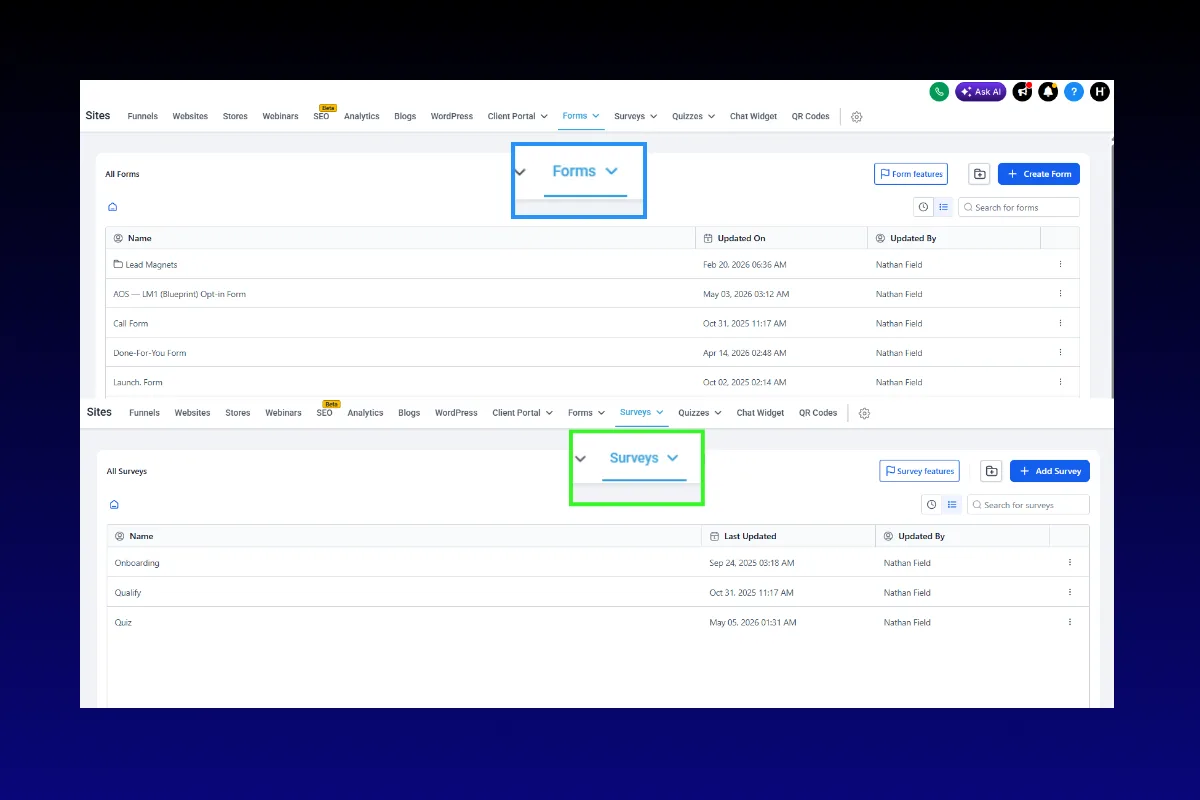
Not every lead deserves a spot on your calendar, and the fastest way to protect your time is to qualify them before they ever book a call. GoHighLevel's forms and surveys let you collect exactly the information you need, route leads based on their answers, and trigger automations that treat high-value prospects differently from tire-kickers.
Most coaches, consultants, and agencies skip this step entirely. They run ads, send traffic to a booking page, and then wonder why 40% of their discovery calls go nowhere. The problem is not the traffic. The problem is the filter, or rather, the complete absence of one.
GoHighLevel gives you two distinct tools for collecting information: forms and surveys. They look similar on the surface, but they serve different purposes and behave differently inside the platform. Understanding when to use each one, and how to combine them with conditional logic and workflow automations, is the difference between a lead pipeline that wastes your time and one that prints money.
Forms vs. Surveys: What Is the Difference?
This is the first thing that trips people up. GoHighLevel has both forms and surveys in the platform, and most people use them interchangeably. They should not.
Forms
Forms are the simpler of the two. They collect contact information, name, email, phone number, and a few custom fields. They work well for:
- Opt-in pages (lead magnet downloads)
- Contact us pages
- Simple registration flows
- Newsletter signups
- Event RSVPs
Forms map directly to GoHighLevel contact fields. When someone submits a form, their data populates a contact record in the CRM immediately. If the contact already exists, the record updates instead of creating a duplicate.
Best use case: Capturing leads quickly with minimal friction.
Surveys
Surveys are multi-step. They support conditional logic, branching paths, custom scoring, and more complex question types. They work well for:
- Lead qualification questionnaires
- Application forms for high-ticket programs
- Discovery call pre-screening
- Client intake processes
- Market research
Surveys can show or hide questions based on previous answers. A prospect who says they have a budget over $5,000 sees different follow-up questions than one who selects under $1,000. This is conditional logic, and it is where surveys become a serious business tool.
Best use case: Filtering and scoring leads before they reach your sales team.
“Forms capture leads. Surveys qualify them. Use the wrong one and you are doing twice the work for half the result.”
Building a Lead Qualification Survey: Step by Step
Let's build an actual qualification survey that you can deploy in your GoHighLevel account today. This example is for a coaching business that offers a high-ticket program, but the framework adapts to any service-based business.
Step 1: Define Your Qualification Criteria
Before you touch the builder, write down what makes someone a qualified lead for your business. Be specific.
For a coaching business, qualification criteria might include:
- Budget: Can they afford your program? ($3,000+ is the threshold)
- Timeline: Are they ready to start now, or browsing for someday?
- Problem awareness: Do they understand the problem they need to solve?
- Decision authority: Are they the one who makes the purchase decision?
- Current situation: Are they already in business, or just thinking about it?
These criteria become your survey questions. Each answer maps to a qualification score.
Step 2: Create the Survey in GoHighLevel
Navigate to Sites > Forms/Surveys > Surveys and click Create Survey.
Give it a clear internal name like "Discovery Call Qualification Survey" so your team knows what it is.
Step 3: Design Your Questions
Here is a proven question sequence for high-ticket lead qualification:
Question 1: What best describes your current situation?
- I am starting from scratch (just an idea)
- I have an existing business making under $5K/month
- I am making $5K-$20K/month and want to scale
- I am making $20K+/month and need systems
This question segments your leads immediately. Someone making $20K+/month has a completely different conversation than someone with just an idea.
Question 2: What is your biggest challenge right now?
- Getting consistent leads and clients
- Converting leads into paying customers
- Delivering my service at scale
- Building systems and automations
This reveals their primary pain point. It also primes them for the sales conversation by getting them to articulate their problem.
Question 3: How soon are you looking to solve this?
- Immediately, I am ready to invest now
- Within the next 30 days
- In the next 2-3 months
- Just researching for now
Timeline urgency. "Just researching" leads should not be on your calendar. They should go into a nurture sequence.
Question 4: What is your budget for solving this problem?
- Under $1,000
- $1,000 to $3,000
- $3,000 to $10,000
- $10,000+
The budget question is non-negotiable for high-ticket businesses. It saves everyone time. Someone with a $500 budget is not a fit for a $5,000 program, and that is okay.
Question 5: What is the best email and phone number to reach you?
Standard contact fields. Place these last, after the prospect has invested time and attention in answering your qualification questions. Conversion rates are higher when contact fields come at the end rather than the beginning.
“Put the easy questions first, the commitment questions last. By the time they reach the contact fields, they have already invested too much time to abandon the survey.”
Step 4: Add Conditional Logic
This is where surveys become powerful. Click on any question and select Logic to create branching paths.
Example conditional rules:
- If Budget = "Under $1,000" → Skip to a "Thank you" page with a link to your free resources. Do not show the booking step.
- If Timeline = "Just researching" → Show a different final page that offers a lead magnet instead of a call booking.
- If Current Situation = "$20K+/month" → Add a hidden tag "high-value-lead" to their contact record.
Conditional logic lets you create a single survey that handles multiple qualification paths. Hot leads get sent to your calendar. Cold leads get sent to a nurture sequence. Unqualified leads get a polite redirect. All automatic.
Step 5: Configure the Thank You Page
GoHighLevel lets you control what happens after submission. Your options:
- Redirect to URL: Send qualified leads to your calendar booking page.
- Show message: Display a custom thank you message with next steps.
- Open new page: Show a different funnel page based on their responses.
For the qualification survey, set up two paths:
- Qualified leads → Redirect to your discovery call booking page (GoHighLevel calendar link)
- Unqualified leads → Show a message: "Thanks for your interest! Based on your answers, our free training might be the best next step for you." Include a link to your Lead Magnet OS content.
Connecting Surveys to Workflow Automations
The survey is only half the system. The real power comes from what happens after submission. GoHighLevel's workflow automations let you build sophisticated follow-up sequences triggered by survey responses.
Automation 1: Tag and Score Leads
Create a workflow triggered by "Survey Submitted." Use conditions based on custom field values to assign tags:
- Budget $10K+ AND Timeline "Immediately" → Tag: "hot-lead", Lead Score: 90
- Budget $3K-$10K AND Timeline "30 days" → Tag: "warm-lead", Lead Score: 70
- Budget under $1K OR Timeline "Researching" → Tag: "nurture", Lead Score: 20
These tags and scores feed into your pipeline management and help your sales team prioritize follow-up.
Automation 2: Route Qualified Leads
When a lead scores above your threshold (let's say 70+), trigger an automated sequence:
- Instant SMS: "Hey [First Name], thanks for filling out the application. I have reviewed your answers and I would love to chat. Book your call here: [calendar link]"
- Email confirmation: Branded email with what to expect on the discovery call
- Internal notification: Alert to your team's Slack or email with the lead's survey responses
- Pipeline stage: Move the contact to "Application Submitted" in your sales pipeline
Automation 3: Nurture Unqualified Leads
Leads who score below your threshold are not lost. They are just not ready yet. Trigger a different workflow:
- Immediate email: Deliver a free resource relevant to their stated challenge
- Drip sequence: 5-7 value emails over the next 14 days
- Re-engagement: At day 30, send a "Things changed?" email with a link back to the qualification survey
“The leads you nurture today become the buyers of tomorrow. Do not throw them away because they are not ready right now.”
Automation 4: No-Show Recovery
This pairs with your calendar. If a qualified lead books a discovery call but does not show up, trigger:
- SMS at +5 minutes: "Hey [First Name], I think we missed each other. Want to reschedule? [link]"
- Email at +1 hour: Follow-up with a rescheduling link
- SMS at +24 hours: Final outreach with urgency
Studies consistently show that 30-50% of no-shows will rebook if contacted within the first hour. Automating this recovery sequence is free revenue.
Advanced Survey Techniques
Multi-Step Surveys With Progress Bars
Long surveys kill completion rates. But multi-step surveys with visible progress bars convert surprisingly well. GoHighLevel surveys support this natively.
The trick is one question per step. Each step feels quick and easy. The progress bar creates commitment: "I am already 60% done, might as well finish." Completion rates for multi-step surveys typically run 20-40% higher than single-page equivalents.
Hidden Fields for UTM Tracking
Add hidden fields to your survey that capture UTM parameters from the URL. This lets you track which ad campaigns, platforms, or content pieces generate your best qualified leads, not just the most leads.
In GoHighLevel, add custom fields like:
utm_sourceutm_mediumutm_campaignutm_content
Set them as hidden fields that auto-populate from URL parameters. Now every survey submission carries attribution data. You can see that your Facebook leads have a 15% qualification rate while your YouTube leads qualify at 45%. That changes how you allocate your ad budget.
Embedding Surveys in Funnels
Surveys can be embedded directly into your GoHighLevel funnel pages. This is cleaner than linking to a separate survey URL. The survey becomes part of the funnel flow.
Build your funnel like this:
- Page 1: Headline + value proposition + embedded survey
- Page 2 (qualified): Calendar booking
- Page 2 (unqualified): Free resource delivery
The High Ticket OS template comes with this flow pre-built. Discovery call funnel with embedded qualification built right in.
Custom CSS for Branded Surveys
GoHighLevel's default survey styling is functional but generic. Add custom CSS to match your brand:
- Font family and sizes
- Button colors and hover states
- Input field styling
- Background colors or images
- Spacing and padding
Branded surveys convert better because they feel intentional, not like a generic form someone threw together in five minutes.
Forms Best Practices for Lead Capture
While surveys handle qualification, forms still play a critical role in your lead capture strategy. Here are the rules for building forms that convert.
Keep It Minimal
Every additional field reduces conversion rate. For a top-of-funnel opt-in, you need exactly two fields: name and email. That is it. Do not ask for phone number, company name, or job title on a lead magnet download form. You can collect that information later.
Place Forms Above the Fold
The form should be visible without scrolling. If visitors have to hunt for where to enter their information, you have already lost a percentage of them. Above the fold, clear headline, clear benefit, clear form.
Use Smart Defaults
GoHighLevel forms support placeholder text. Use it to show the expected format:
- "Your first name"
- "[email protected]"
- "(555) 123-4567"
Placeholder text reduces friction because people do not have to think about what goes where.
Pre-Fill Known Data
If someone is already in your CRM and clicks a link you sent them, GoHighLevel can pre-fill form fields from their contact record. This reduces friction to almost zero and dramatically increases completion rates for returning contacts.
“Every click, every field, every second of confusion costs you leads. Strip your forms down to the absolute minimum.”
Measuring What Matters
Building forms and surveys is step one. Measuring their performance is how you improve over time.
Key Metrics to Track
- Submission rate: What percentage of visitors complete the form/survey? Industry benchmark for surveys is 20-35%.
- Qualification rate: What percentage of submissions meet your qualification criteria? Aim for 40-60%. Lower means your traffic targeting is off. Higher means your survey is too lenient.
- Show rate: What percentage of qualified leads who book a call actually show up? Target 70-80%.
- Close rate from qualified leads: This is the metric that matters most. Qualified leads should close at 30-50% or higher.
- Cost per qualified lead: Total ad spend divided by qualified submissions. This is the number that determines your profitability.
A/B Testing Surveys
Test different question sequences, wording, and conditional logic paths. GoHighLevel's reporting shows completion rates by step, so you can identify exactly where people drop off.
Common tests:
- Budget question placement (early vs. late in the survey)
- Open-ended vs. multiple choice questions
- Number of steps (fewer vs. more granular)
- Progress bar vs. no progress bar
Small improvements compound. A 5% improvement in completion rate, combined with a 10% improvement in qualification rate, combined with a 5% improvement in show rate yields significantly more closed deals from the same traffic.
FAQ
What is the difference between GoHighLevel forms and surveys?
Forms are simple data collection tools best for opt-ins and contact capture. Surveys support multi-step flows, conditional logic, and branching paths, making them ideal for lead qualification and screening.
Can I add conditional logic to GoHighLevel forms?
No. Conditional logic (showing or hiding questions based on previous answers) is only available in surveys. If you need branching logic, use a survey.
How many questions should a qualification survey have?
Five to seven questions is the sweet spot. Enough to properly qualify without losing people to survey fatigue. Keep each question focused on a single qualification criterion.
Can surveys trigger workflow automations in GoHighLevel?
Yes. Survey submissions can trigger any workflow automation. You can tag contacts, assign lead scores, send SMS and email sequences, move pipeline stages, and create tasks, all based on survey responses.
Should I put the contact information fields first or last in a survey?
Last. When contact fields come at the end, prospects have already invested time answering your questions. This creates psychological commitment that increases completion rates by 20-40% compared to leading with contact fields.
Can I embed a survey inside a GoHighLevel funnel page?
Yes. Surveys can be embedded directly into funnel pages using the survey element in the page builder. This creates a seamless experience where the survey is part of the funnel flow rather than a separate destination.
How do I track which ad campaigns generate the best qualified leads?
Add hidden fields for UTM parameters (utmsource, utmmedium, utm_campaign) to your survey. These auto-populate from the URL and get stored in the contact record, letting you measure qualification rates by traffic source.
What is a good survey completion rate?
Industry benchmarks for multi-step surveys sit between 20% and 35%. If you are below 20%, your survey is too long, too confusing, or asking for information too early. If you are above 35%, you are likely doing well with your question design and funnel flow.
Ready to build a lead qualification system that filters out the wrong prospects and books calls with the right ones? Grab the High Ticket OS and get a discovery call funnel with built-in qualification, ready to deploy in GoHighLevel today.