
Coaches who post consistently on social media get clients. Coaches who post when they remember get crickets. The difference is not talent or creativity. It is having a system that makes posting predictable instead of relying on motivation and memory.
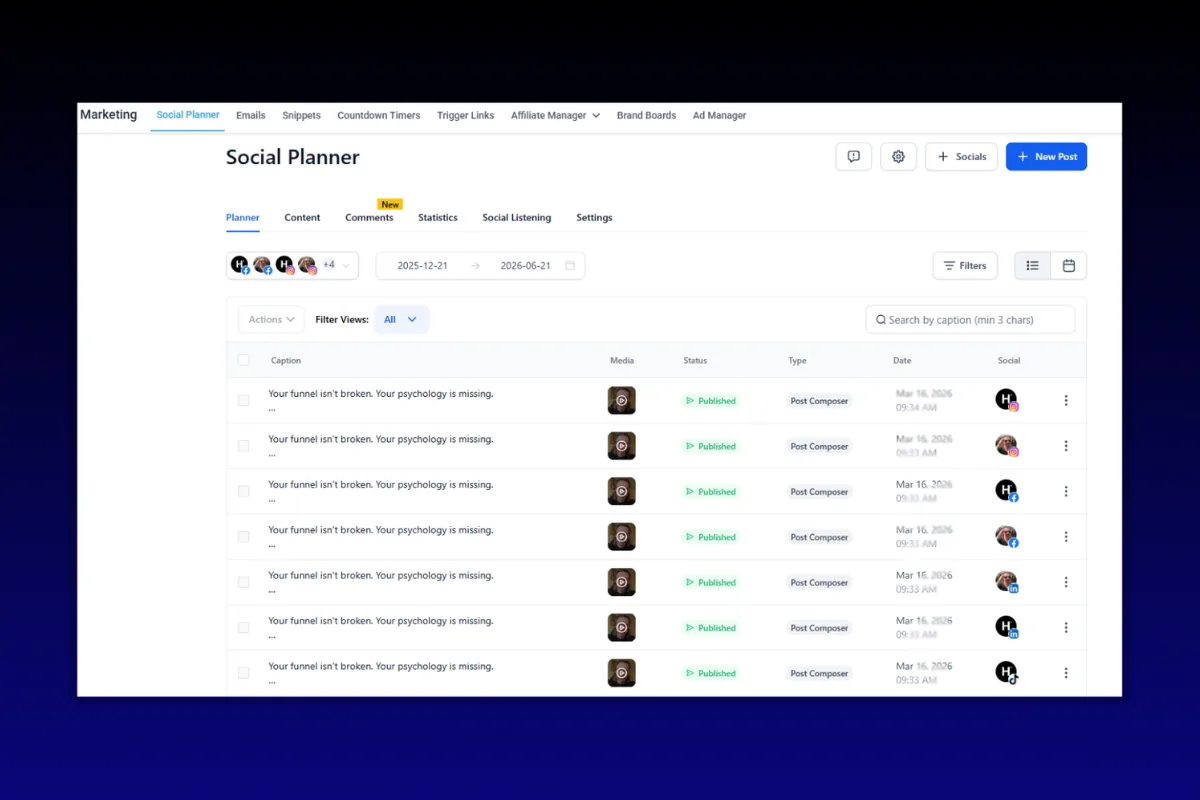
GoHighLevel includes a built-in Social Media Planner that lets you schedule posts across Facebook, Instagram, Google Business Profile, LinkedIn, TikTok, and X (Twitter) from one dashboard. No separate social media tool. No extra subscription. It is already inside the platform you use for your CRM, funnels, and automations.
This guide covers how to set up the Social Planner, connect your accounts, create and schedule posts, use the content calendar, set up recurring posts, and build a posting strategy that actually drives leads into your pipeline.
Why Coaches Struggle With Social Media Consistency
The pattern looks the same everywhere. A coach gets motivated, posts three times in one week, feels good about it, then gets busy with client work and goes silent for two weeks. The algorithm punishes the inconsistency, reach drops, and they wonder why social media "does not work" for them.
The problem is never a lack of content ideas. It is a lack of a system. When posting depends on you remembering to do it, opening the app, writing something, and hitting publish in the moment, it will always be the first thing to fall off your plate when things get busy.
The Social Planner inside GoHighLevel solves this by letting you batch-create content and schedule it in advance. Spend two hours on Monday scheduling your week's content, and then you never think about posting for the rest of the week.
“Consistency beats creativity on social media. A good post every day outperforms a great post once a month.”
Setting Up the GoHighLevel Social Planner
Connecting Your Social Accounts
Before you can schedule anything, you need to connect your social media accounts to GoHighLevel.
Navigate to Marketing, then Social Planner in your GoHighLevel dashboard.
Click Connect Account or go to Settings and then Social Media.
Select the platform you want to connect.
Authorize GoHighLevel to access your account.
Supported Platforms
Important Setup Notes
Instagram requires a Facebook connection. Your Instagram Business account must be linked to a Facebook Page. This is a Meta requirement, not a GoHighLevel limitation.
Google Business Profile is a high-value connection most coaches ignore. Regular posts on your GBP improve local search visibility and show up when people Google your business name.
Personal Facebook profiles cannot be connected. You need a Facebook Page. If you do not have one, create one specifically for your coaching brand.
TikTok requires a Business account, which is free to set up. Switch from a personal account in TikTok settings.
Creating and Scheduling Posts
Composing a Post
In the Social Planner, click Create Post or click on a date in the calendar view.
Select which social accounts you want to publish to.
Write your caption. You can customize the text for each platform (recommended, since what works on LinkedIn does not work on Instagram).
Add media: images, videos, or carousels.
Add hashtags (Instagram and TikTok especially).
Choose your publishing time: Post Now, Schedule for Later, or Save as Draft.
Platform-Specific Customization
This is a feature most people miss. When you select multiple platforms, GoHighLevel lets you customize the post for each one individually. Use this.
LinkedIn: Professional tone, longer form, no hashtag overload. 3 to 5 hashtags max.
Instagram: Conversational, engaging first line (the hook), up to 30 hashtags (though 8 to 15 targeted ones perform better).
Facebook: Medium length, conversational, questions drive engagement.
X/Twitter: Punchy, concise, one clear idea per tweet.
Google Business Profile: Local and business-focused. Include a CTA when possible.
Writing one generic caption and blasting it everywhere is the fastest way to look lazy on every platform simultaneously.
“Same message, different delivery. Tailor your content to each platform's culture or your audience will scroll right past it.”
Scheduling Best Practices
Batch your content creation. Set aside 2 to 3 hours per week to create and schedule all your posts. This is more efficient than daily posting.
Post during active hours. Each platform has peak engagement times. As a general guide for B2B coaching audiences: LinkedIn (Tuesday through Thursday, 8-10 AM), Instagram (Monday through Friday, 11 AM-1 PM), Facebook (Wednesday through Friday, 1-4 PM).
Use the calendar view. GoHighLevel's calendar shows all scheduled posts across platforms. Use it to spot gaps and ensure consistent coverage.
Schedule at least a week ahead. This gives you a buffer. If an urgent client situation comes up, your social media keeps running.
Using the Content Calendar
The Social Planner's calendar view is your command center. It shows all scheduled, published, and drafted posts across every connected platform in one visual timeline.
How to Use It Effectively
Color-coded by platform: Quickly see which platforms have content scheduled and which have gaps.
Drag and drop: Reschedule posts by dragging them to a new date. Simple and fast.
Filter by platform: View only Instagram posts, only LinkedIn, or all of them. Helpful when planning platform-specific campaigns.
Monthly, weekly, daily views: Zoom in or out depending on what you are planning.
Content Calendar Strategy for Coaches
A simple, repeatable content calendar removes decision fatigue. Here is a framework that works for most coaching businesses:
Monday: Motivational or mindset post. Start the week with energy. Share a personal insight or client story.
Tuesday: Educational post. Teach something specific and actionable. "How to [solve a specific problem]" or "3 mistakes I see coaches make with [topic]."
Wednesday: Behind-the-scenes or personal post. Show the human side. Your morning routine, your workspace, a challenge you are facing.
Thursday: Social proof. Client testimonial, case study result, or before/after transformation.
Friday: Engagement post. Ask a question, run a poll, or start a debate. Get people talking.
Weekend (optional): Lighter content. A personal update, a book recommendation, or a casual photo.
This framework gives you 5 to 7 posts per week with clear direction for each day. Adapt it to your niche and audience.
“Content calendars do not kill creativity. They channel it. Knowing what type of content to create each day makes the blank page a lot less intimidating.”
Setting Up Recurring Posts
Some content should run on repeat. Weekly promotions, evergreen tips, monthly roundups, or regular CTAs can be set up as recurring posts in GoHighLevel.
How to Create a Recurring Post
Create a new post in the Social Planner.
Instead of selecting a single date, choose Recurring from the scheduling options.
Set the frequency: daily, weekly, bi-weekly, or monthly.
Choose the day(s) and time(s) for each recurrence.
Set an end date or let it run indefinitely.
Publish.
Smart Uses for Recurring Posts
Weekly CTA post: Every Friday, post a call-to-action linking to your lead magnet or booking page. Set it up once and it runs every week.
Monthly testimonial rotation: Schedule a different client testimonial for the first of every month.
Google Business Profile updates: Post a weekly business update to keep your GBP active and improve local rankings.
Evergreen tips: If you have a library of tips that stay relevant, rotate them on a schedule so new followers see them.
A Word of Caution
Do not over-rely on recurring posts. They are great for consistent CTAs and evergreen content, but your audience can tell when everything feels automated. Mix in timely, spontaneous content alongside your scheduled posts. The Social Planner should handle the baseline while you add fresh content on top.
Connecting Social Media to Your Sales Pipeline
This is where GoHighLevel's all-in-one advantage shows up. Your social media planner lives in the same platform as your CRM, funnels, and automations. This means you can create a direct path from social media content to booked calls and paid clients.
Strategy 1: Link to Lead Magnets in Social Posts
Every educational post is an opportunity to capture a lead. End your posts with a CTA pointing to your lead magnet funnel:
"Want the complete checklist? Grab it free: [link to opt-in page]"
Because your opt-in page and follow-up sequences are in GoHighLevel, the lead enters your pipeline automatically. No manual data entry. No syncing between tools.
Strategy 2: Use Your Bio Link
Most platforms limit you to one link in your bio. Use that link strategically:
Point it to your Quiz or lead magnet opt-in
Or use a link-in-bio page built in GoHighLevel to offer multiple CTAs
Track clicks using GoHighLevel's built-in analytics
Strategy 3: Respond to Engagement With Automation
When someone comments on your post or sends a DM, GoHighLevel's Conversation AI can automatically respond and capture their information. This turns passive engagement into active leads.
Set up a workflow:
Trigger: New DM or comment with a specific keyword
Action: Send an automated response with your booking link or lead magnet
Action: Create a contact in your CRM and add to your pipeline
Strategy 4: Track Social-Sourced Revenue
Tag contacts who come through social media channels. Use UTM parameters in your links so GoHighLevel can attribute leads and revenue back to specific social posts or campaigns. This tells you which content actually makes money, not just which gets likes.
“Likes pay nothing. Leads pay everything. Build the bridge from your content to your pipeline.”
Content Ideas That Drive Leads for Coaches
If you stare at the Social Planner wondering what to post, here are proven content categories that attract coaching clients:
Transformation Stories
Share client results with specifics. "Sarah came to us doing $3K/month with zero systems. Within 90 days, she hit $12K/month with automated follow-up handling 80% of her lead nurture." Numbers and timelines make it real.
Contrarian Takes
Challenge common advice in your niche. "Unpopular opinion: posting every day will not grow your coaching business. Here is what actually will." These posts spark debate and get shared.
Process Breakdowns
Show exactly how you do something. Walk through your discovery call framework, your client onboarding process, or how you structure a coaching session. Transparency builds trust.
Tool Walkthroughs
Show your audience how to use GoHighLevel or other tools you recommend. Screen recordings, step-by-step posts, or quick tip videos position you as the expert who simplifies complexity.
Personal Stories
Share your journey. The mistakes you made, the pivots that worked, the lessons that shaped your approach. Vulnerability and honesty cut through the polished highlight reels.
Quick Wins
Give your audience something they can implement in 5 minutes. A script they can copy, a template they can use, a one-step fix for a common problem. These get saved and shared more than any other content type.
Measuring Social Media Performance
Posting without tracking is guessing. GoHighLevel's Social Planner includes basic analytics, and you can supplement with platform-native insights.
Metrics That Matter for Coaches
Engagement Rate: Likes, comments, shares, and saves divided by reach. This tells you if your content resonates.
Link Clicks: How many people are actually clicking through to your lead magnets, booking pages, or website. This is the metric that connects social media to revenue.
Follower Growth: Steady growth indicates your content is attracting new people. Flat or declining means your content is not reaching beyond your existing audience.
DMs and Inquiries: Direct messages asking about your services are the highest-intent social signal. Track these manually if your platform does not report them.
Pipeline Attribution: In GoHighLevel, check how many contacts entered your pipeline via social media links. This is the metric that actually matters for your business.
Monthly Social Media Review
Set aside 30 minutes at the end of each month to review:
Which posts got the most engagement?
Which posts drove the most link clicks?
Which content types generated actual leads or sales?
What topics or formats should you do more of?
What should you stop doing?
Use these insights to refine your content calendar for the next month. Social media strategy is not set-and-forget. It evolves based on data.
“Track what makes money, not what makes likes. A post with 10 likes and 3 discovery call bookings beats a viral post that generates zero revenue every single time.”
GoHighLevel Social Planner vs. Dedicated Tools
If you are wondering whether GoHighLevel's Social Planner can replace tools like Buffer, Hootsuite, or Later, here is the honest assessment.
Where GoHighLevel Wins
All-in-one platform. Your social media, CRM, funnels, email, and automations are in one place. No syncing, no extra subscriptions.
Direct pipeline integration. Content leads to leads, leads to pipeline, pipeline to sales. The data flows naturally.
Cost savings. Social media tools run $15 to $100+ per month. GoHighLevel includes the Social Planner in every plan.
Where Dedicated Tools Win
Advanced analytics. Tools like Sprout Social or Hootsuite offer deeper reporting and competitive analysis.
Content discovery. Some tools suggest trending topics or hashtags. GoHighLevel does not.
Team collaboration. Larger teams with multiple content creators might find dedicated tools have better approval workflows and role-based access.
The Verdict for Coaches
If you are a solo coach or small team already using GoHighLevel, the built-in Social Planner handles 90% of what you need. The convenience of having everything in one platform outweighs the marginal feature advantages of dedicated tools.
If you are running a larger agency managing social media for dozens of clients, a dedicated tool might make sense alongside GoHighLevel for CRM and automation.
FAQ
Can I post to personal Facebook profiles with GoHighLevel?
No. Facebook's API only allows posting to Pages, not personal profiles. Create a Facebook Page for your coaching brand if you do not already have one. You can still share Page posts to your personal profile manually.
Does GoHighLevel support Instagram Reels and Stories?
Yes. GoHighLevel supports scheduling Instagram Reels (video uploads) and Stories through the Social Planner. Your Instagram account must be a Business or Creator account connected through a Facebook Page.
How many social accounts can I connect?
This depends on your GoHighLevel plan. The standard plans support multiple social accounts per sub-account. For most coaching businesses, you can connect all your active platforms without hitting limits.
Can I schedule carousel posts on Instagram?
Yes. GoHighLevel supports scheduling carousel posts (multiple images in a single post) for Instagram. Upload your images in order when creating the post.
Is there an AI content writer in the Social Planner?
GoHighLevel has been rolling out AI-powered content suggestions and generation features. Check the Social Planner for an AI assist option when composing posts. It can help with caption ideas, hashtag suggestions, and content variations.
Can I approve posts before they go live?
Yes. The Social Planner supports draft mode and approval workflows. You or a team member can create posts as drafts, and they will not publish until manually approved. This is useful if you have a VA creating content that needs your review.
How far in advance can I schedule posts?
There is no practical limit. You can schedule posts weeks or months ahead. Many coaches batch-create a month of content at once and schedule it all in one sitting.
Does the Social Planner work with YouTube?
As of early 2026, direct YouTube scheduling is not available in GoHighLevel's Social Planner. You can create content in GoHighLevel and manually upload to YouTube, or use a dedicated YouTube scheduling tool alongside GoHighLevel for everything else.
Build Your Social Media System This Week
Stop treating social media as something you do when you have spare time. Build a system: connect your accounts, create a content calendar, batch your content creation, and schedule a week ahead.
The Website OS includes a professional web presence that works hand-in-hand with your social media strategy, giving your audience a polished destination when they click through from your posts.
Consistent posting is not about willpower. It is about systems. Set up your Social Planner, build your calendar, and let the scheduling do the heavy lifting while you focus on coaching.