
Most coaches and consultants are still doing manually what GoHighLevel can do automatically in the background while they sleep. Following up with leads by hand, sending appointment reminders one at a time, copying data between spreadsheets. Every hour spent on repetitive tasks is an hour not spent closing deals or serving clients.
GoHighLevel workflows are the backbone of every well-run coaching and consulting business on the platform. They're not fancy extras or nice-to-haves. They're the difference between a business that scales and one that stays stuck at the same revenue ceiling because the owner is too busy doing admin work to grow.
This guide covers 10 specific GoHighLevel workflow automations that replace tasks you're probably paying a VA to do right now. Each one includes the trigger, the actions, and the logic behind why it works.
What Are GoHighLevel Workflows?
If you're new to HighLevel, workflows are the automation engine inside the platform. They work on a simple trigger-action model: something happens (the trigger), and then a sequence of actions fires automatically.
Triggers can be things like:
A form gets submitted
An appointment gets booked
A contact replies to a message
A pipeline stage changes
A tag gets added
A specific date arrives
Actions can include:
Sending an SMS or email
Creating a task
Adding or removing tags
Moving contacts through pipeline stages
Sending internal notifications
Waiting for a specific time or condition
Updating custom fields
Triggering webhooks to external tools
The power isn't in any single trigger or action. It's in how you chain them together to create systems that run without you touching anything.
“The best automation is the one your leads never notice and your team never has to think about.”
Workflow 1: Speed-to-Lead Response
What it replaces: A VA monitoring your inbox and responding to new leads
The problem: When a lead fills out your form, every minute that passes reduces the chance of conversion. Research shows that responding within 5 minutes makes you 21 times more likely to qualify a lead compared to waiting 30 minutes. Most businesses respond in hours. Some take days.
The workflow:
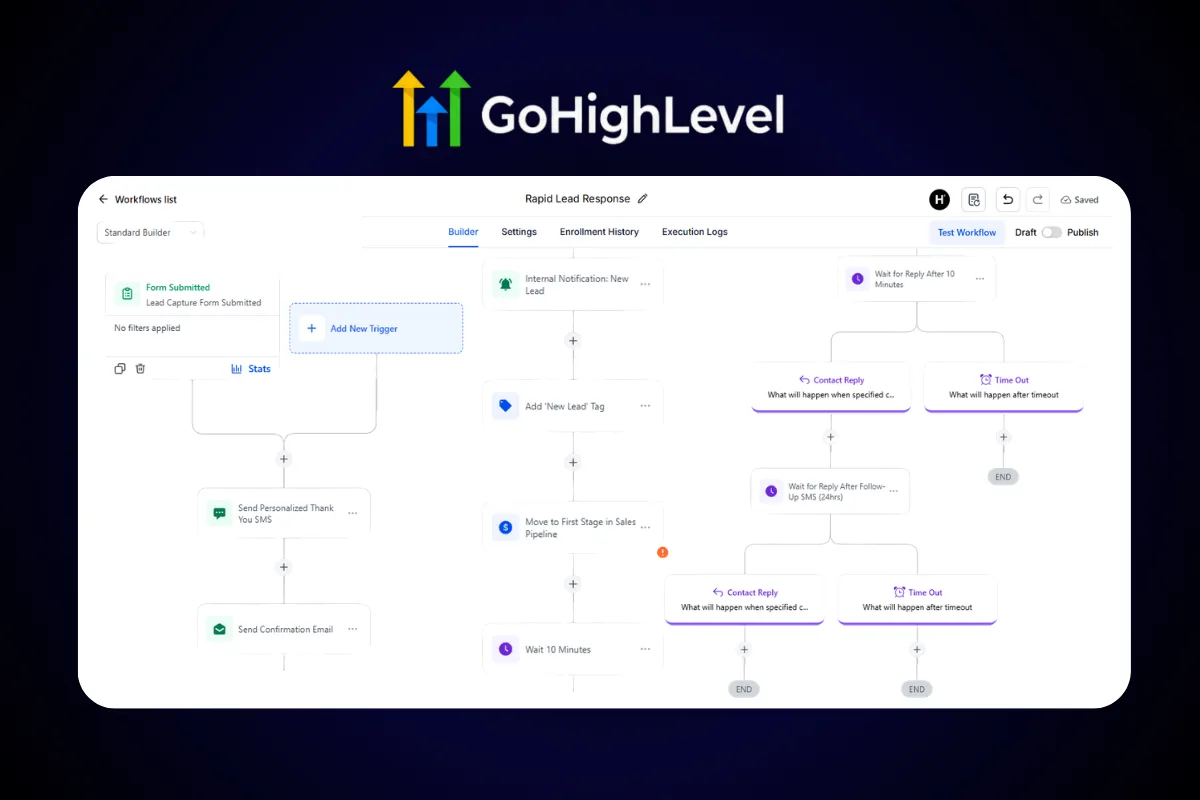
Trigger: Form submitted (any lead capture form)
Action 1: Send SMS within 60 seconds. Keep it personal: "Hey [First Name], thanks for reaching out. I saw you're interested in [offer]. Quick question: what's your biggest challenge with [topic] right now?"
Action 2: Send email confirmation with what to expect next
Action 3: Create internal notification for your team
Action 4: Add tag "New Lead" and move to first pipeline stage
Action 5: Wait 10 minutes. If no reply, send follow-up SMS
Action 6: Wait 24 hours. If still no reply, send a different angle via email
This workflow alone can double your lead-to-call conversion rate. Most competitors aren't responding for hours. You're there in under a minute.
Why It Works
The first response sets the tone for the entire relationship. When a lead gets an immediate, relevant reply, they assume you're professional, organized, and attentive. That assumption carries through every future interaction. When they get silence for three hours, they assume the opposite.
“Speed doesn't just win leads. It frames every conversation that follows.”
Workflow 2: Appointment Reminder Sequence
What it replaces: A VA sending manual reminder messages before calls
The problem: No-shows kill your calendar and your revenue. The industry average no-show rate for discovery calls sits between 20-30%. That means if you book 20 calls this week, 4-6 people won't show up. Each no-show costs you the time you blocked and the revenue you could have earned.
The workflow:
Trigger: Appointment booked (calendar event created)
Action 1: Immediate confirmation SMS + email with call details
Action 2: Wait until 24 hours before appointment. Send reminder SMS: "Looking forward to our call tomorrow at [time]. Here's the link: [meeting URL]"
Action 3: Wait until 1 hour before appointment. Send final reminder: "We're on in 1 hour. See you at [time]!"
Action 4: If appointment is cancelled, remove from pipeline stage and trigger re-engagement sequence
Three touchpoints between booking and showing up. That's the difference between a 30% no-show rate and a 10% no-show rate.
Pro Tip: Add Value in Your Reminders
Don't just remind them. Give them something to consume before the call. Link to a case study, a short video, or a pre-call questionnaire. A prospect who shows up prepared is 3x more likely to buy than one who shows up cold.
Workflow 3: Post-Call Follow-Up
What it replaces: Manually emailing prospects after every discovery call
The workflow:
Trigger: Appointment status changed to "showed" or pipeline stage moved to "Call Completed"
Action 1: Wait 30 minutes after call ends
Action 2: Send personalized email recap (use custom fields populated during the call)
Action 3: If proposal was sent, wait 48 hours, then send follow-up
Action 4: If no response after 5 days, trigger a "going cold" SMS sequence
Action 5: Update pipeline stage based on response or lack thereof
The key here is the timing. Thirty minutes after the call, your prospect is still thinking about the conversation. That's when your follow-up lands. Not the next day when they've moved on to 47 other things.
“Follow-up isn't about being persistent. It's about being present at the right moment.”
Workflow 4: Lead Nurture Drip Campaign
What it replaces: Manually sending educational content to leads who aren't ready to buy
The problem: Only 3% of your market is ready to buy right now. Another 7% is open to it. The remaining 90% needs time, education, and trust-building before they'll consider your offer. If you only focus on the hot leads, you're ignoring 97% of your potential revenue.
The workflow:
Trigger: Tag added "Lead - Not Ready" or pipeline stage "Nurture"
Action 1: Wait 2 days. Send educational email #1 (topic: biggest mistake in their niche)
Action 2: Wait 3 days. Send SMS with link to case study
Action 3: Wait 4 days. Send email #2 (topic: how your system works)
Action 4: Wait 3 days. Send email #3 (topic: client results and transformations)
Action 5: Wait 5 days. Send re-engagement offer (free training, strategy call, limited bonus)
If at any point they reply: Exit this workflow, notify your team, move to active pipeline
A well-built nurture sequence converts leads over weeks and months. The businesses that skip nurturing leave massive revenue on the table.
Content Strategy for Nurture
Don't just talk about yourself. Each touchpoint should teach something valuable. If a prospect learns something useful from your nurture emails, they associate you with expertise. When they're ready to buy, you're the obvious choice.
Workflow 5: Review and Testimonial Collection
What it replaces: A VA emailing clients asking for reviews
The workflow:
Trigger: Pipeline stage moved to "Client - Completed" or custom date field (30 days after start)
Action 1: Send SMS: "Hey [Name], I hope you've been seeing great results from [service]. Would you mind leaving us a quick review? It takes 30 seconds: [Google Review Link]"
Action 2: Wait 3 days. If no review detected, send email with a different angle: "Your experience could help someone in the same position you were in. Here's the link: [Google Review Link]"
Action 3: Add tag "Review Requested" to prevent duplicate asks
Simple, automated, and respectful. No awkward phone calls. No VA copying and pasting the same message to 50 clients.
“Social proof compounds. Every review you collect today sells for you tomorrow.”
Workflow 6: Re-engagement for Cold Leads
What it replaces: Manually scrolling through your CRM trying to find leads who went quiet
The workflow:
Trigger: Contact has not opened an email or replied to SMS in 30 days AND has the tag "Lead"
Action 1: Send SMS: "Hey [Name], I noticed we haven't connected in a while. Still working on [their goal]? No pressure either way."
Action 2: Wait 3 days. If reply, route to active pipeline. If no reply, send one final email: "I'm cleaning up my list. Should I keep you on it or would you rather I remove you?"
Action 3: If no response after 7 more days, add tag "Inactive" and remove from active sequences
The "should I remove you?" email is one of the highest-performing re-engagement tactics. People hate losing access to something, even if they weren't using it. It triggers a response that reopens the conversation.
Workflow 7: Birthday and Anniversary Messages
What it replaces: A spreadsheet of client birthdays and a VA who forgets half of them
The workflow:
Trigger: Custom date field "Birthday" matches today's date
Action 1: Send SMS: "Happy birthday, [Name]! Hope you have an amazing day."
Action 2 (optional): Send email with a special offer or discount code
This takes 5 minutes to set up and runs forever. The impact on client retention and referrals is disproportionately large. People remember who remembered.
Workflow 8: Onboarding Sequence for New Clients
What it replaces: A VA sending welcome emails and onboarding checklists manually
The workflow:
Trigger: Pipeline stage moved to "Client - Onboarding"
Action 1: Immediately send welcome email with access links, login credentials, and first steps
Action 2: Wait 1 day. Send email #2: "Here's how to get the most out of your first week"
Action 3: Wait 3 days. Send check-in SMS: "How's everything going? Any questions so far?"
Action 4: Wait 7 days. Send email #3 with tips, resources, and quick wins
Action 5: Wait 14 days. Internal task created: "Schedule 2-week check-in call with [Name]"
Action 6: Move to "Client - Active" pipeline stage
A structured onboarding experience reduces churn, increases satisfaction, and sets the standard for the entire client relationship. When clients feel guided and supported from day one, they stick around.
“The first 14 days decide whether a client stays for 14 months.”
Workflow 9: Invoice and Payment Reminders
What it replaces: Chasing unpaid invoices via email
The workflow:
Trigger: Invoice created (or custom date field for payment due date)
Action 1: Send payment reminder 3 days before due date
Action 2: Send confirmation when payment is received
Action 3: If payment is overdue by 1 day, send polite reminder SMS
Action 4: If overdue by 7 days, send email with updated invoice link
Action 5: If overdue by 14 days, create internal task for manual follow-up
Nobody enjoys chasing payments. Automate it. The consistent, professional cadence gets invoices paid faster than sporadic manual emails.
Workflow 10: Referral Request System
What it replaces: Awkwardly asking for referrals at random times
The workflow:
Trigger: Custom date field "90 days after client start" OR pipeline stage "Client - Results Achieved"
Action 1: Send email: "You've been seeing great results with [service]. Know anyone who could benefit from the same? I have a special offer for clients who refer: [incentive]."
Action 2: Wait 5 days. If no response, send SMS with a more casual ask
Action 3: If referral is made, trigger thank-you sequence and apply referral credit
Timing is everything with referrals. Ask too early and the client hasn't experienced results yet. Ask too late and the excitement has faded. The 90-day mark is the sweet spot for most service businesses.
“Your best sales channel is a happy client who tells their friends.”
How to Build Your First Workflow in GoHighLevel
If you haven't built a workflow yet, here's the step-by-step:
Navigate to Automation in the left sidebar, then Workflows
Click Create Workflow
Choose Start from Scratch (or pick a pre-built recipe)
Click Add New Trigger at the top of the canvas
Select your trigger event (form submitted, appointment booked, tag added, etc.)
Add your first action by clicking the + button below the trigger
Configure each action with your specific messaging, timing, and conditions
Use If/Else branches to create different paths based on contact behavior
Test the workflow by creating a test contact and triggering the event
Toggle the workflow to Published when you're ready to go live
Start with one workflow. Get it working. Then build the next one. Trying to automate everything at once leads to broken sequences and missed messages.
Building Workflows Faster with Templates
Building 10 workflows from scratch takes time. That's why pre-built templates exist.
The High Ticket OS comes with ready-made workflows for discovery call funnels, including speed-to-lead response, appointment reminders, and post-call follow-up. You import the snapshot, customize the messaging, and you're live.
For lead generation funnels, the Lead Magnet OS includes opt-in workflows, nurture sequences, and conversion tracking already wired up.
Templates don't just save time. They give you proven structure that you can customize instead of guessing what a workflow should look like from zero.
Measuring Workflow Performance
Automations aren't "set and forget." Track these metrics monthly:
If a workflow underperforms, check three things: message timing, message relevance, and message length. Most problems trace back to one of those three.
The Compound Effect of Workflow Automation
Here's where it gets interesting. Each of these workflows saves you 2-5 hours per week individually. Stack all 10 and you're looking at 20-40 hours per month of recovered time.
But the real impact isn't the time saved. It's the consistency. A VA has off days. They get sick. They quit. They forget to send the follow-up. Workflows don't have off days. They execute the same way, every time, at exactly the right moment.
Over 12 months, a business running these 10 workflows will have:
Responded to every lead within 60 seconds
Sent 3 reminders before every appointment
Followed up after every call within 30 minutes
Nurtured every cold lead with valuable content
Asked every happy client for a review and a referral
Onboarded every new client with a structured welcome sequence
That level of consistency is nearly impossible to achieve manually. With GoHighLevel workflows, it's the default.
“Automation doesn't replace the human touch. It makes sure the human touch happens every single time.”
FAQ
How many workflows can I create in GoHighLevel?
There's no limit. GoHighLevel allows unlimited workflows on every plan. You can create as many as your business requires without hitting caps or paying per-workflow fees. Start with the highest-impact workflows (speed-to-lead and appointment reminders) and expand from there.
Do GoHighLevel workflows work with SMS and email?
Yes. Workflows support both SMS and email as action steps, along with voicemail drops, Facebook Messenger, Instagram DMs, and internal notifications. You can use multiple channels within the same workflow to reach contacts wherever they're most responsive.
Can I use if/else conditions in GoHighLevel workflows?
Absolutely. If/else branches are one of the most powerful features. You can create different paths based on contact tags, custom field values, whether they opened an email, replied to a message, booked an appointment, or any other condition in your CRM. This lets one workflow handle multiple scenarios intelligently.
Will workflow automations feel impersonal to my leads?
Only if you write them that way. Use custom values (first name, company, specific interests) to personalize every message. Write in a conversational tone, not corporate speak. The best automated messages feel like they came from a real person because the content is relevant and the timing is right.
How do I know if my workflows are actually working?
Check the workflow execution log in GoHighLevel. It shows every contact who entered the workflow, which actions fired, and where contacts are currently sitting. Combine this with your pipeline reporting to see how workflow-nurtured leads convert compared to manually handled ones.
Can I import pre-built workflows into GoHighLevel?
Yes. GoHighLevel snapshots allow you to import entire accounts worth of workflows, funnels, pipelines, and automations. Templates like the High Ticket OS include pre-built workflows you can import and customize in minutes instead of building from scratch.
What happens if a contact triggers multiple workflows at once?
GoHighLevel handles concurrent workflows per contact. Each workflow runs independently. To prevent message overlap, use tags and workflow entry conditions. For example, add a tag "In Nurture Sequence" and set your other workflows to exclude contacts with that tag.
How long does it take to set up these 10 workflows?
If you're building from scratch, plan for 1-2 hours per workflow for the initial setup and testing. That's 10-20 hours total. Using pre-built templates cuts that to 30-60 minutes per workflow since the structure and messaging are already in place. Either way, the time investment pays for itself within the first month.
Ready to stop doing manually what your CRM should handle automatically? The High Ticket OS includes pre-built workflows for speed-to-lead response, appointment reminders, and follow-up sequences. Import it, customize your messaging, and let your automations run while you focus on closing deals.