 Nathan Field
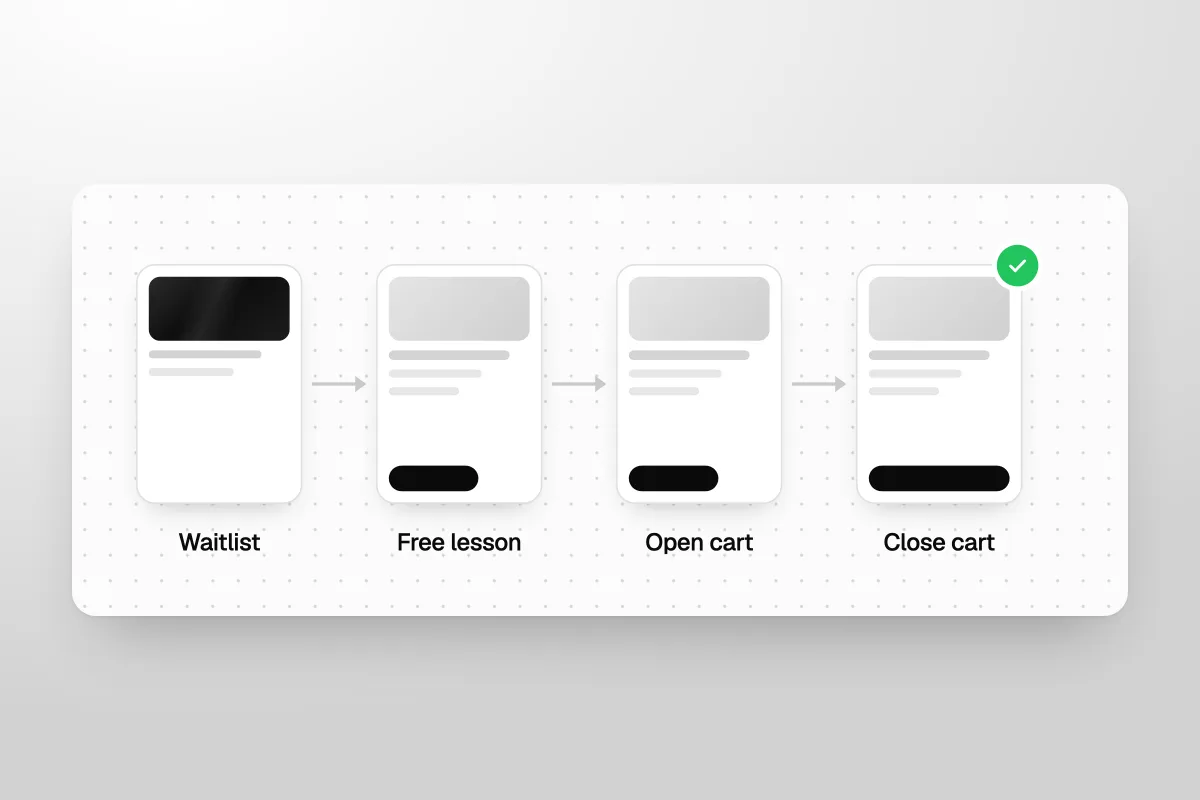
A course launch is a short, planned window when you open sales for your online course, sell hard for a few days, then close the cart. A launch that sells has four parts in order: a waitlist, a warm-up with a free lesson, open cart, and close cart. This guide walks through each one, with timings and what to send each day.
The short answer
Plan a course launch in four steps. Build a waitlist for two to six weeks. Warm it up for a few days with a free lesson or webinar. Open cart for about a week and email every day. Then close cart on time, as you said you would. After that, fix what did not convert and start the next waitlist.
What is a course launch?
A course launch is a sales event with a start and an end. For a set number of days, people can buy your course. Before that, they can only join a waitlist. After it, the doors close again.
The other way to sell a course is evergreen: the course is always for sale, and people buy whenever they find you. Both work. Here is the difference:
| Launch | Evergreen | |
|---|---|---|
| When people can buy | A few days, a few times a year | Any day |
| Why people buy now | The cart closes on a real date | They need it today, or an offer pushes them |
| Your workload | Big bursts, then quiet | Steady, with ads and emails running all the time |
| Best for | New courses, cohorts, courses with live parts | Proven courses with steady traffic |
Our view: launch first. A launch tells you fast whether people will pay, and the deadline does a lot of the selling for you. Move to evergreen once you know what makes people buy.
Before you launch: are you ready?
A launch sells a course to people who already know you. If nobody knows you yet, there is no one to launch to. So before any launch, you need three things: one clear buyer, proof that people will pay (a pre-sale is best), and an email list. Our guide on how to market an online course covers all three. This post picks up from there: the launch itself.
A launch does not create buyers. It turns people who already trust you into buyers, on a deadline.
How long should a course launch be?
About three to eight weeks from start to finish, with the actual selling window lasting around a week. Here is the shape we plan around. These are our rules of thumb, not fixed laws. Stretch or shrink them to fit your list.
| Phase | How long | The goal |
|---|---|---|
| Waitlist | 2 to 6 weeks | Collect names of people who want in |
| Warm-up | 3 to 7 days | Teach something useful with a free lesson or webinar |
| Open cart | 5 to 7 days | Sell, answer questions, follow up |
| Close cart | The last 24 to 48 hours | Final reminders, then shut the doors |
| After | 1 to 2 weeks | Welcome buyers, learn from non-buyers, restart the waitlist |
Why only a week of open cart? Long enough for people to see the emails, ask questions and get paid. Short enough that the deadline feels real. A month-long cart just gives people a month to forget.
Step 1: How do you build a waitlist?
A waitlist is a simple page where people leave their name and email to hear first when the course opens. It does two jobs. It tells you how much interest there is before you open. And it gives you a warm group to sell to on day one.
Here is what goes on the waitlist page:
- Who the course is for, in one line.
- What they will be able to do after it.
- When doors open, if you know the date.
- A form with name and email. Nothing more.
Then send people to it. Post about the topic, mention the waitlist at the end of every piece of content, and email your list. If you have a free guide or quiz already, add the waitlist to its thank-you page.
One tip: keep the waitlist open between launches. When the doors close, people still want in. Give them a place to go instead of a dead "sold out" page.
Step 2: What warm-up content works?
The warm-up is a few days of free teaching right before you open cart. Its job is to show people you can help them, so the sales email feels like the next step, not a cold pitch.
The two formats that work best for a course launch:
- A free lesson. One real lesson from the course, or a short series of two or three. People get a quick win and a taste of how you teach.
- A live webinar or workshop. 45 to 60 minutes of teaching, then the offer at the end. It has a fixed date, which builds energy. Our guide to webinar funnels covers how to run one.
Whichever you pick, the free lesson should solve one small problem completely. Not a teaser. A real win. The course then solves the bigger problem around it.
End every warm-up piece with the same line: when the cart opens, and that waitlist members hear first.
Step 3: What happens when you open cart?
Open cart is the selling window. On day one, three things must be ready and tested:
- A sales page. Who it is for, what they get, proof, the price, and a clear button. A short video at the top helps.
- A checkout that works on a phone. Test it with a real card before day one. A broken checkout on launch day is the most expensive bug there is.
- An email sequence. Written and scheduled before you open, so you can spend open cart answering people instead of writing.
Keep the offer simple. One course, one price, or a small set of plans. Every extra option is one more reason to "think about it" until the cart closes.
What should you send each day of open cart?
Email every day of open cart. It feels like a lot. It is not, because each email has a different job. Here is a seven-day plan:
| Day | Its job | |
|---|---|---|
| 1 | Doors are open | Tell the waitlist first. What it is, the price, the link. |
| 2 | What is inside | Walk through the modules and what each one gets them. |
| 3 | Proof | A real student result or story, in their words. |
| 4 | Questions answered | The top questions people asked, answered plainly. |
| 5 | Who it is not for | Be honest. It builds trust with the people it is for. |
| 6 | 24 hours left | The deadline, plainly. What they lose if they wait. |
| 7 | Closing tonight | One or two short reminders, the last a few hours before close. |
Plan for two busy moments: the day the cart opens and the last day. Put your strongest emails there. And stop emailing anyone who buys. Nothing annoys a new student like a "last chance" email after they paid.
Email is not the only channel. If people message you on Instagram or reply to your emails, answer fast. Many buyers have one question before they pay.
Every email in open cart should answer one reason someone has not bought yet.
Step 4: Should you close the cart?
Yes. If you said the cart closes on Friday at midnight, close it on Friday at midnight. The deadline is what makes a launch work. If you reopen it the next day for latecomers, your next launch's deadline means nothing, and your list learns to wait.
This is also about honesty. Fake urgency, like a countdown timer that resets, is a fast way to lose trust. A real close is fair to the people who bought on time.
A deadline you keep sells this launch. A deadline you break costs you the next one.
What about people who miss it? Send them to the waitlist. They hear first next time. That is a real reason to join, not a trick.
What should you do after the launch?
The week after a launch decides how good the next one will be. Do these five things:
- Welcome buyers well. A clear first step, a welcome email and a quick win in the first lesson. Happy early students become your proof next time.
- Ask non-buyers why. One short email: "What stopped you?" with three or four options. The answers tell you what to fix.
- Look at the numbers. Waitlist size, warm-up attendance, sales page visits, checkout starts and sales. Find the step where most people dropped off.
- Fix the biggest leak. One change at a time, so you know what worked.
- Reopen the waitlist. Your next launch starts now.
How many sales do you need to make a launch worth it?
Add up what the launch costs you: ads, software, any help you hire, and your own time. Then work out how many sales cover it. Our free break-even calculator does the maths in a minute.
That number is your floor. Knowing it before you open cart stops you from panicking on day three, or from spending more on ads than the launch can earn back.
What does a launch look like in real life?
Here is one we worked on. Dirk DeBruin sells a trading course and community at Intelligent Crypto. On our homepage we describe it as a $100K launch, with the landing page, checkout and Instagram DM system built end to end.
The shape is the one in this post. Doors open a few times a year. When the doors are closed, a waitlist collects names, so people hear first when doors open again. A free offer with follow-up emails warms people up between launches. And the sales page sells three plans. You can read how it fits together in the Intelligent Crypto case study.
The lesson we took from it: the launch week gets the attention, but the waitlist and the follow-up between launches do the quiet work that makes launch week sell.
What are the most common course launch mistakes?
- Launching to nobody. No list, no waitlist, no warm-up. Then wondering why nobody bought.
- A broken checkout. Not tested on a phone with a real card.
- Too many options. Five plans and three bonuses turn a yes into a maybe.
- Too few emails. One email on open and one on close. Most people miss both.
- A deadline that moves. Reopening the cart teaches your list to wait.
- No follow-up. Nobody answering questions or chasing people who started checkout.
- Nothing after. No survey, no numbers, no waitlist, so the next launch starts from zero.
Who will this not suit?
This will not suit you if your course is cheap and always selling well on its own. A launch takes real effort, and an evergreen funnel may serve you better. It also will not suit you if you have no audience at all yet. Build the list first, then launch. If you sell coaching rather than a course, see how to get coaching clients instead.
If you have the course and the audience but not the time to build the waitlist page, sales page, checkout and email follow-up, that is the part we do. Havstock Unlimited builds and runs the launch pages, checkout and follow-up for course creators, as part of a monthly marketing team.
FAQ
How long should a course launch be?
Plan about three to eight weeks in total. Spend two to six weeks building a waitlist, three to seven days on warm-up content, and about five to seven days with the cart open. Keep the selling window short so the deadline feels real. A cart left open for a month mostly gives people time to forget.
What is open cart and close cart?
Open cart is the window when your course is for sale. Close cart is when that window ends and people can no longer buy. Between launches, people can only join a waitlist. The fixed close date is what pushes people to decide, so it only works if you really close on time.
Do I need a webinar to launch a course?
No. A webinar is one good way to warm people up, but a free lesson or a short series of lessons works too. Pick the format you can deliver well. The goal is the same either way: show people you can help them, so the sales email feels like the obvious next step.
How many emails should I send during a launch?
Email every day of open cart, with a different job for each email: the open, what is inside, proof, questions, who it is not for, 24 hours left, and closing tonight. Send one or two extra reminders on the last day. Stop emailing anyone as soon as they buy.
Should I reopen the cart for people who missed it?
No. If you reopen for latecomers, your next deadline means nothing, and your list learns to wait. Send people who missed it to the waitlist instead. They will hear first when doors open again. That keeps it fair for everyone who bought on time.
Can I launch a course with a small email list?
Yes. A small list of people who really want the result can sell more than a big cold one. Run a small launch, even a pre-sale, to prove people will pay. Then use what you learn and the students you win to grow the list for the next course launch.
That is how to plan a course launch that sells: a waitlist, a free lesson, a short open cart with daily emails, and a close cart you keep. Then learn from it and start the next waitlist straight away.