 Nathan Field
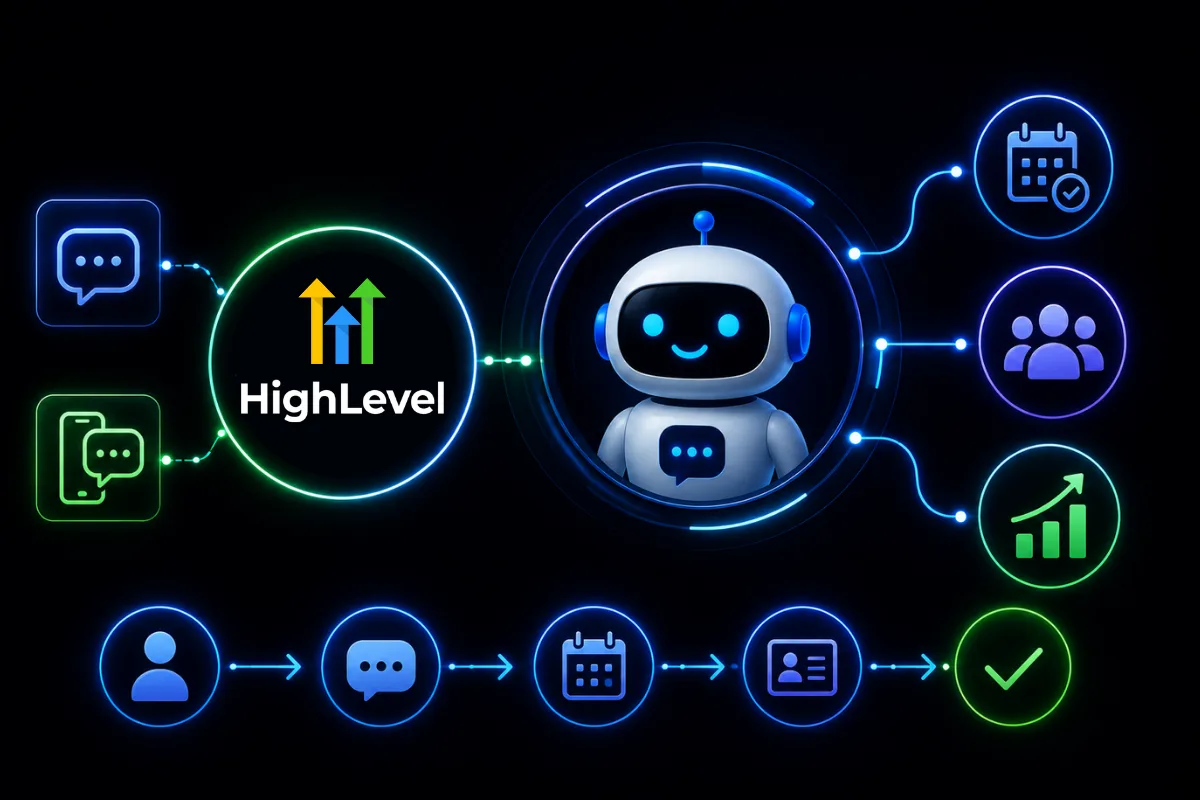
GoHighLevel Conversation AI is the chat bot built into GoHighLevel. It answers your leads by text, web chat, email, social DMs and WhatsApp, asks them a few questions and books them into your calendar. Instead of waiting for someone to answer a call or a Facebook message, the lead gets a reply in seconds.
Conversation AI is designed to do exactly that. But is it actually worth using? For agencies, coaches and local businesses, the answer depends on how you plan to use it.
The short answer
GoHighLevel Conversation AI is worth it if you get the same questions every day and will spend a few hours training it. It works on SMS, email, Facebook, Instagram, WhatsApp, live chat, the chat widget and TikTok. You pay token costs as you go, or $50 or $97 a month per sub-account on an AI Employee plan. Texts cost extra.
Prices and channels from GoHighLevel's help pages, checked 1 October 2026. To try it, our special link gives you a 30-day free trial of GoHighLevel plus a free live bootcamp (we may earn a commission from this link). Sign up on GoHighLevel's own site and you get the standard 14 days, with no bootcamp.
What Is GoHighLevel Conversation AI?
Conversation AI is an AI agent built into GoHighLevel. It reads a lead's message, understands what they want, answers from what you trained it on, and guides them to the next step. It can draft replies for your team to send (Suggestive mode) or send them itself (Auto-Pilot).
Typical tasks include:
- Answering FAQs
- Qualifying leads
- Booking appointments
- Collecting customer information
- Responding after business hours
- Handing conversations to your team
Think of it as your first line of communication.
Which channels does it work on?
Each bot is switched on per channel from its Deploy tab. The channels are SMS, Email, Facebook, Instagram, WhatsApp, Live Chat, Chat Widget and TikTok (GoHighLevel help: Conversation AI channels and routing, checked 1 October 2026).
Google Business Profile chat is not on the list. Google switched it off in July 2024 (GoHighLevel help: Google Business Profile chat sunset), so any guide that still lists it as a channel is out of date.
Conversation AI is one part of GoHighLevel's AI Employee plan, which also covers the AI phone agent and AI review replies. If you are weighing up the whole bundle and whether its monthly fee is worth it, read our GoHighLevel AI Employee review. This post is about the chat bot.
Why Businesses Are Using Conversation AI
Customers expect quick responses. If someone has to wait several hours for an answer, there's a good chance they'll contact a competitor instead.
Conversation AI helps solve this by replying at any hour. Benefits include:
- Faster response times
- Improved customer experience
- More booked appointments
- Reduced workload for staff
- Better lead qualification
For agencies managing multiple clients, this can save hours every week.
How Conversation AI Works
A typical customer journey might look like this:
- Website Visitor
- Starts Chat
- Conversation AI Responds
- Answers Questions
- Books Appointment
- Creates CRM Contact
- Notifies Sales Team
Everything happens inside GoHighLevel.
What GoHighLevel Conversation AI Costs (checked 1 October 2026)
You pay for the AI one of three ways, per sub-account (GoHighLevel help: AI Product Pricing, updated 28 September 2026):
| Plan | Monthly fee | Conversation AI |
|---|---|---|
| Pay-Per-Use | $0 | Billed by tokens (the text the AI reads and writes) |
| AI Employee Growth | $50 | 1,000 agent responses a month, then pay-per-use |
| AI Employee Unlimited | $97 | Unlimited, fair use |
On Pay-Per-Use the price depends on the model you pick. GPT-5 Mini costs $0.25 per million tokens in and $2.00 per million out. GPT-5 costs $1.25 in and $10.00 out. GoHighLevel's own example: a conversation using 100,000 input tokens and 25,000 output tokens on GPT-5 costs $0.375. Long chats, long prompts and a big knowledge base all use more tokens.
Two costs sit on top of the AI, on every plan:
- SMS replies are texts. Each one is billed like any other text you send. Our GoHighLevel pricing guide has the per-text rates.
- WhatsApp replies are now billed. From 1 October 2026, service messages, the normal replies inside WhatsApp's 24-hour window, are charged after the first 1,000 per phone number each month (GoHighLevel help: WhatsApp pricing). Before that date they were free.
Best Use Cases
Conversation AI performs especially well for repetitive conversations.
Local Businesses
Businesses such as dentists, salons and contractors get similar questions every day. Conversation AI can answer:
- Business hours
- Pricing
- Service availability
- Appointment scheduling
- Location information
Marketing Agencies
Agencies can use Conversation AI to:
- Qualify new leads
- Book strategy calls
- Collect project information
- Answer service questions
- Route enquiries to the correct team member
This improves response times without adding payroll.
Coaches and Consultants
Instead of manually replying to every enquiry, coaches can automate:
- Discovery call bookings
- Program information
- Pricing questions
- Frequently asked questions
- Follow-up reminders
This keeps the sales process moving even when you're unavailable.
Conversation AI vs Traditional Chatbots
Traditional chatbots rely on rigid decision trees. Conversation AI is more conversational and flexible.
| Traditional Chatbot | Conversation AI |
|---|---|
| Scripted responses | Context-aware conversations |
| Limited flexibility | Natural interactions |
| Fixed menu options | Dynamic responses |
| Manual updates to every path | Improves when you edit its prompt and training |
The result feels much more like chatting with a real person. If you do want fixed paths, the Flow Based Builder gives you branching inside Conversation AI too.
How to Set Up GoHighLevel Conversation AI
Setup is not hard, but a badly set up bot is worse than no bot. Here is the order we would follow.
Create the bot. Go to AI Agents, then Conversation AI, and create a bot. Pick a setup method: Guided Form Setup is the easiest start, Prompt Based Bot gives you full control of the prompt, and Flow Based Builder is for visual, step-by-step qualification.
Give it an identity. Set a name, a short role ("a friendly assistant for a business coaching company"), a tone that matches your brand, and clear limits. Write down what it must never do, such as promise results or discuss refunds.
Set one main goal. For most service businesses that is "book a call". Add a few smaller goals under it, like collecting an email or answering program questions. A bot that tries to do everything does nothing well.
Train it. Add every question prospects ask you again and again. Pull them from your inbox, DMs and sales calls. Point it at your website and sales pages, and upload your program outline or service list. The bot can only be as good as what you give it.
Pick your channels. Turn on channels from the bot's Deploy tab. In many accounts this still needs the Labs setting "Conversations AI Channel Management" switched on first, under Settings, then Labs. Start with web chat and SMS. That is where the most ready-to-buy leads are.
Set handoff rules. Use the Human Handover action so a person takes over when the lead asks for one, or when the bot can't answer. Notify your team and pass the full conversation along, so nobody asks the same questions twice.
Test it, then pick the mode. Use the test chat inside the bot first. Then run it in Suggestive mode for a few days, so your team approves each reply. Switch to Auto-Pilot once the answers are right. After the first two days live, read the real conversations and add answers for anything it missed.
Qualify before you book
Not every lead should get a slot on your calendar. Have the bot ask two or three questions first, such as the main challenge, the timeline and whether they have worked with someone before. Then:
- Qualified: it offers times and books the call
- Not ready yet: it sends a useful free resource instead
- Either way: it tags the contact so the right follow-up starts
- A high-value lead: it notifies your team straight away
Use more than one bot
You can run several bots in one sub-account, each with its own training and goal. Each bot's Deploy tab sets where it answers, and contact tags set who it answers. A common split is a sales bot for new leads, a support bot for existing clients, and a re-engagement bot for old leads in your database.
Connect it to your workflows
Conversation AI gets far more useful inside GoHighLevel workflows. A new form fill can start a bot conversation by SMS. A booking can move the contact to the next pipeline stage and start your reminder sequence. A missed call can send a text and hand the reply to the bot, which is the idea behind missed call text back.
Best Practices
To get the best results:
- Train the AI with your business information.
- Add accurate FAQs.
- Connect your calendars.
- Test conversations regularly.
- Create clear handoff rules for human support.
Remember, the quality of the AI depends on the quality of the information you provide.
Common Mistakes
Expecting AI to Close Every Sale
Conversation AI is excellent at starting conversations and qualifying leads. Complex negotiations still benefit from a person.
Poor Training
If the AI doesn't know your services or pricing, it can't give helpful answers. Spend time setting it up properly.
Forgetting to Review Conversations
Read the chat history regularly to spot what to improve. Small changes can make a big difference.
Pushing for the Booking Too Soon
Nobody likes being sold to by a robot in the first message. Answer the question first. Then guide them to the call.
Forgetting Mobile
Most leads will see your chat on a phone. Check that the chat bubble does not cover your main button, and that it is easy to type in.
Should You Use GoHighLevel Conversation AI?
If your business receives regular enquiries, the answer is likely yes. Conversation AI helps you:
- Respond faster
- Capture more leads
- Book more appointments
- Improve customer satisfaction
- Reduce repetitive work
It will not suit you if you get a handful of messages a week and already reply fast, or if you will not spend the time to train it. A half-trained bot that guesses at prices does more harm than a slow human reply.
GoHighLevel Conversation AI isn't designed to replace your sales team. It's designed to make them more efficient. By handling repeat conversations, qualifying leads and booking appointments, it lets your team focus on the conversations that need a person.
The easiest way to judge it is to build one bot on your own questions and watch it work. Our special link gets you a 30-day free trial plus a free live bootcamp. Texts and other usage are still charged during the trial.
FAQs
What is GoHighLevel Conversation AI?
It's GoHighLevel's AI chat bot. It answers leads on SMS, email, Facebook, Instagram, WhatsApp, live chat, the chat widget and TikTok. It can answer questions, qualify prospects, collect contact details and book appointments, either drafting replies for your team or sending them itself.
How much does GoHighLevel Conversation AI cost?
On Pay-Per-Use there is no monthly fee and you pay token costs as it works. AI Employee Growth is $50 a month per sub-account with 1,000 agent responses included. AI Employee Unlimited is $97 a month, fair use. Texts and WhatsApp messages are billed on top. Checked 1 October 2026.
Does it work with Google Business Profile chat?
No. Google shut down Business Profile chat in July 2024, so it is no longer a channel in GoHighLevel or anywhere else. If a lead finds you on Google, they can still call, text or use the chat widget on your website, and the bot can answer those.
Can Conversation AI replace customer support?
It can handle many common questions, such as hours, prices, bookings and simple how-to answers. Complex issues, complaints and anything that needs judgement should still go to your team. Set up Human Handover so those reach a person quickly, with the full conversation attached.
Does it integrate with GoHighLevel CRM?
Yes. Conversations, contacts, appointments and workflows all connect directly with the CRM. The bot can fill contact fields, add tags, book into your calendars and start workflows, so a chat turns into a tracked lead without anyone copying details across by hand.
Is Conversation AI good for agencies?
Yes. Agencies can use it for their own business and for clients to speed up replies and qualify leads. Each client sub-account gets its own bots, training and channels. Agencies can also put clients on an AI Employee plan and resell it at their own price.
Will leads know they are talking to a bot?
That depends on how you set it up. Our advice is to be upfront. Most people do not mind talking to AI as long as it is quick and actually helps, and they mind a lot when they find out later.
Who Sets It Up?
GoHighLevel is the tool. Someone still has to write the bot's instructions, train it on your business, connect it to your calendar and workflows, and read the chats every week to fix weak answers. If you would rather hand that part over, see how Havstock Unlimited works.