 Nathan Field
Your next client is reading your reviews right now, and if there are only three of them from two years ago, they are already clicking on your competitor. Online reviews are one of the most underrated growth levers for coaches, consultants, and service-based businesses. Everyone knows they matter. Almost nobody has a system for collecting them consistently.
GoHighLevel reputation management is the Reputation tab inside each sub-account. It connects your Google Business Profile and Facebook page, texts and emails review requests, repeats them until the client clicks, shows every review in one place, and can draft or post replies with Reviews AI. It is a core feature on every GoHighLevel plan (checked 1 October 2026).
The problem is not that clients are unhappy. Most are thrilled with the results. The problem is that asking for reviews feels awkward, remembering to ask is inconsistent, and following up when someone forgets takes time you do not have. So the reviews trickle in randomly, if they come at all.
GoHighLevel's built-in reputation tools automate that process. From sending review requests at the right moment to watching what people say about you, GHL turns review collection from a manual chore into a background process that runs on its own. If you want to try it, our special link gets you a 30-day free trial of GoHighLevel (we may earn a commission from this link) plus a free live bootcamp. Sign up on GoHighLevel's own site and you get the standard 14 days, with no bootcamp.
This guide walks through the complete setup: configuring review requests, building automation workflows, handling negative feedback, and using social proof to convert more leads.
Why Reviews Drive Revenue
Before diving into the setup, here is why reputation management is not optional.
The Trust Factor
People check reviews before they hire. For high-ticket services like coaching and consulting, the stakes are higher. When someone is about to invest $3,000 to $10,000 in a coaching program, they want proof that others got results.
Reviews provide that proof in a way that marketing copy never can. A potential client reading "I doubled my revenue in 90 days working with this coach" from a real person carries more weight than any sales page headline.
The SEO Factor
Google's own tips to improve your local ranking say that more reviews and positive ratings can help your business's local ranking. That affects where you show up when someone searches "business coach near me" or "marketing consultant [city]."
Your review count is a ranking signal you control, unlike the age of your website or how many sites link to you.
Reviews are not just social proof. They are an SEO asset that compounds over time.
The Conversion Factor
Reviews on your sales pages answer the question every buyer has: did this work for people like me? Adding a review widget or testimonial section to your funnel pages puts that answer where the decision happens. When you combine a strong offer with visible social proof, objections drop.
Setting Up GoHighLevel Reputation Management
GoHighLevel's reputation management feature lives under the Reputation tab in your sub-account. New sub-accounts get a guided setup wizard on the Reputation Overview page. Here is how to configure it from scratch. Menu paths are from GoHighLevel's help docs, checked 1 October 2026.
Step 1: Connect Your Platforms
Go to Reputation > Settings > Integrations. Connect the platforms where you want to collect and monitor reviews:
- Google Business Profile (most important for local visibility)
- Facebook Business Page
- Other review sites such as Yelp or TripAdvisor, where your region and account support them
Google Business Profile is the priority. If you only connect one platform, make it Google. For coaches and consultants operating online, you can also send people to Trustpilot or your industry directory with a custom review link (Step 3).
Step 2: Configure Your Review Request Template
Set up your templates in Reputation > Settings > SMS Requests and Email Requests. Put the review link in with the {{reputation.review_link}} token. Here is what works:
SMS Template (higher response rates):
"Hey [First Name], it was great working with you! Would you mind leaving a quick review about your experience? It takes less than 60 seconds: [Review Link]. Thanks so much!"
Email Template:
Subject: Quick favor, [First Name]?
Body: Keep it short. Thank them for working with you, mention a specific result if possible, include the review link with a clear call to action, and set expectations on time ("takes about 60 seconds").
Keep both templates conversational, not corporate. The message should feel like it came from a person, not a marketing automation. Because technically, it did come from a person. You just automated the timing.
One cost note: GoHighLevel warns that adding an image to the text can send it as an MMS, which costs more than a plain text.
Step 3: Set Up the Review Link
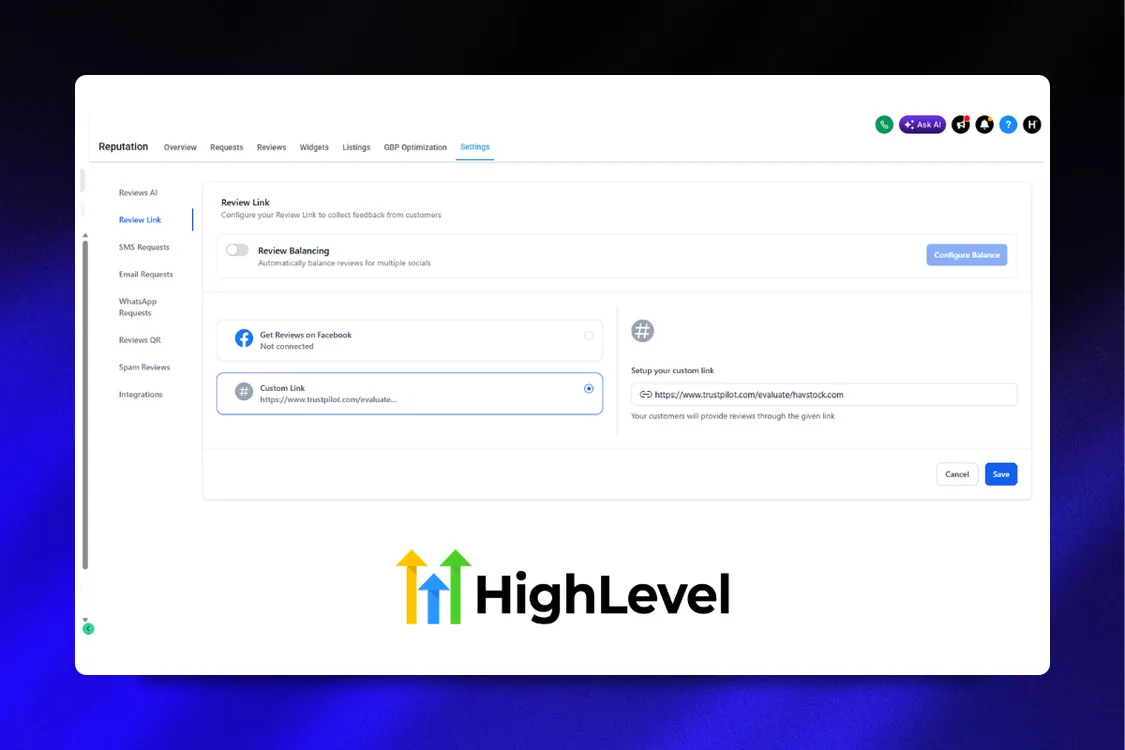
Go to Reputation > Settings > Review Link. Turn on Review Balancing to spread requests across your connected platforms, or choose Custom Link to send everyone to one page. Send that link to every client, not just the ones you think are happy.
Some review tools offer a "review gate" or "sentiment filter": happy customers get the Google link, unhappy ones get a private form. Do not use it. Google's review policy says businesses must not "selectively solicit positive reviews from customers", and the US FTC's Endorsement Guides (16 CFR 255.2) warn that inviting only happy customers "may be an unfair or deceptive practice".
A private feedback form is still useful. Offer it alongside the review link, never instead of it.
Ask every client for a review. Fix complaints by talking to people, not by hiding the review link from them.
Step 4: Watch the Reputation Overview
The Overview tab in Reputation is your dashboard. It shows the reviews coming in and your ratings, and an AI summary card pulls out the themes people mention most. The Requests tab shows every review request you have sent and its status.
Check this weekly at minimum. Daily if you are running active review campaigns.
Building the Review Request Workflow
The real power of GHL's reputation management is in the automation. Here is how to build a workflow that requests reviews at the right moment.
Trigger: When to Ask
Timing is everything. Ask too early and the client has not experienced results yet. Ask too late and the excitement has faded. The best trigger depends on your business model:
- After a coaching call: Trigger when the appointment status changes to Showed in your calendar
- After project delivery: Trigger when a pipeline stage changes to "Delivered" or "Completed"
- After course completion: Trigger when a student finishes your course (if using GHL courses)
- After a specific time period: Trigger X days after a purchase or enrollment
For most coaching businesses, the ideal moment is 24-48 hours after a significant milestone. The client has had time to process the value but the experience is still fresh.
Workflow Structure
Here is a complete review request workflow:
- Trigger: Pipeline stage moves to "Completed" (or the appointment status changes to Showed)
- Wait 24 hours (let the experience settle)
- Send Review Request: this workflow action sends your review request with the direct link
- Add tag: "Review Requested" (prevents duplicate requests)
Let GoHighLevel handle the follow-ups. In Reputation > Settings > SMS Requests, set "Until clicked, repeat this every" to 2 or 3 days and "Maximum retries" to 2. The reminders stop as soon as the client clicks the link.
One thing GoHighLevel cannot do is tell you which client left which review. Its New Review Received trigger is contactless: the review is not linked to a contact. So you cannot branch a workflow on "did this person leave a review". Clicks on the link are what it tracks.
Three touches maximum. After that, move on. Nobody wants to feel hounded for a review.
Catching Problems Without Gating Reviews
You still want to hear about problems early. Do it in a separate step that never decides who gets the review link:
- Check in before the review request: a short "How did everything go?" text a day after delivery. If someone replies with a problem, notify your team and fix it.
- Send the review request to everyone once the job is done, whatever they said in the check-in.
- Add a private feedback option in the same message for anyone who would rather tell you directly.
This keeps you inside Google's review policy. For the wider setup, see our guide to building a review and reputation management system. If a bad review is already up, here is how to remove bad Google reviews, and when you can't.
The businesses with the best public review scores are not the ones with zero complaints. They are the ones who fix complaints fast and ask every client for a review.
Automating Review Responses
Collecting reviews is half the equation. Responding to them is the other half. Google's local ranking tips tell businesses to reply to reviews, because it shows you value feedback, and it shows potential clients that you are engaged and professional.
Positive Review Responses
Do not overthink this. A genuine thank-you with a personal touch works best:
"Thank you for the kind words, [Name]! It was great working with you on [specific thing]. Excited to see what you build next."
You can create 5-10 response templates and rotate through them. Avoid copy-pasting the exact same response for every review. Readers notice.
Using Reviews AI
Reviews AI writes the replies for you. Turn it on in Reputation > Settings > Reviews AI and pick a tone. It can suggest replies for you to approve, or post them on autopilot. On pay-per-use it costs $0.01 per review. It is unlimited on the AI Employee Growth plan ($50/month) and the AI Employee Unlimited plan ($97/month), both per sub-account (checked 1 October 2026). Our GoHighLevel pricing guide lists the other usage fees.
We would keep it on suggest mode, so a person reads every reply before it goes out. A human should answer an unhappy client.
Negative Review Responses
Negative reviews require a different approach:
- Respond promptly (within 24 hours)
- Acknowledge the concern without getting defensive
- Take it offline: "I would love to discuss this further. Could you email me at [email] so we can make this right?"
- Never argue publicly. You are not trying to win the argument. You are showing future clients how you handle problems.
A well-handled negative review can actually improve trust. People are suspicious of businesses with only 5-star reviews. A few 4-star reviews with thoughtful responses make your profile look authentic.
Setting Up Response Notifications
In GoHighLevel, configure notifications so your team gets alerted when a new review comes in:
- 5-star reviews: Notification to marketing team (share on social, use in testimonials)
- 4-star reviews: Notification to account manager (follow up for specifics)
- 3 stars and below: Urgent notification to business owner (address immediately)
Build it with the New Review Received workflow trigger. It can filter by review source, star rating (1 to 5) and spam. Add an internal notification action, with one workflow per rating band. Because the trigger is contactless, the alert goes to your team rather than into a client's contact record.
Using Reviews as Marketing Assets
Reviews sitting on Google are good. Reviews embedded across your marketing funnel are better. Here is how to turn collected reviews into conversion tools.
Funnel Testimonial Sections
Pull your best reviews and feature them on your landing pages. GoHighLevel's review widgets can show them on your site automatically. A high-converting discovery call funnel page should include:
- 3-5 written testimonials with full names and context
- Star ratings where applicable
- Specific results mentioned ("increased revenue by 40%," "booked 12 new clients")
Place testimonials strategically: one below the hero section, a cluster before the call-to-action, and one in the FAQ area. Surround objections with proof.
Social Media Content
Every 5-star review is a social media post waiting to happen. Create a template:
- Screenshot the review
- Add your brand overlay
- Post with a caption that adds context
- Tag the reviewer if they are comfortable with it
One review per week keeps your social proof visible without being repetitive. Batching this into a monthly content calendar takes 30 minutes.
Every review is a piece of marketing content you did not have to write.
Email Signature Social Proof
Add a line to your email signature such as "Rated [your rating] on Google ([number] reviews)" with a link to your profile. Every email you send becomes a subtle trust builder.
Case Study Pipeline
Reviews that mention specific results are case study seeds. When someone writes "I went from 5 clients to 22 in three months," that is your cue to follow up and ask if they would be willing to take part in a detailed case study. Your 5-star notification is where you will spot these, so have whoever gets it flag the ones with real numbers for your marketing team.
Monitoring Competitor Reviews
GoHighLevel's Competitor Analysis, inside Reputation, compares you with up to three competitors. It tracks:
- Their Google star ratings next to yours
- Their review volume over time
- How fast they respond to reviews
It also pulls in data from other review platforms, and it refreshes on its own. Read their recent reviews on Google too. Competitor review monitoring gives you two advantages:
- Content ideas: If competitors get complaints about slow response times, write content about your fast turnaround
- Sales ammunition: Know your competitors' weaknesses when prospects compare options
The Numbers That Matter
Track these metrics monthly to measure your reputation management performance:
- Review requests sent: How many you are asking
- Clicks on the review link: GoHighLevel tracks these for each request
- New reviews per month: Consistency matters more than spikes
- Average star rating: Overall and per platform
- Response rate: Percentage of reviews you respond to (aim for 100%)
- Sentiment distribution: Ratio of 5-star to 4-star to lower
If clicks are low, change your timing or your wording before you send more requests. If clicks are high but few reviews arrive, make the review page easier to reach. Focus on a steady flow rather than chasing a specific total number.
Advanced: Review-Triggered Referral Requests
Here is a workflow most businesses miss: when someone leaves a 5-star review, they are in peak satisfaction mode. That is the ideal moment to ask for a referral.
Because GoHighLevel cannot link a review to a contact, this takes one manual step. When your 5-star notification comes in, find that client and add a "Left Review" tag. Then build a workflow:
- Trigger: Contact tag "Left Review" added
- Wait 1 day
- Send SMS: "Thanks again for the amazing review, [Name]! Quick question: do you know anyone else who could benefit from [your service]? I would love to help them too."
- If they respond with a name: Create a new contact, tag as "Referral from [Original Client]," add to referral pipeline
This turns your happiest clients into active promoters. The review is the trigger because it captures them at their most enthusiastic.
Your best marketing channel is not ads. It is a happy client who just told the internet how good you are.
Common Mistakes to Avoid
Asking Everyone at the Same Time
If you send review requests to your entire client list in one batch, you will get a spike of reviews followed by months of nothing. A steady flow looks more natural to readers than a burst. Space your requests out and build them into your delivery workflow so they happen naturally and continuously.
Incentivizing Reviews
Offering payment, discounts or free goods in exchange for reviews breaks Google's policy, and Google removes incentivized reviews from Maps. Never incentivize. The request itself, timed correctly and worded personally, is enough.
Ignoring Negative Reviews
Pretending a negative review does not exist is worse than the review itself. Unanswered negative reviews tell future clients you do not care about feedback. Respond to every single one, even if it is uncomfortable.
Only Focusing on Google
Google is the priority, but do not ignore other platforms. Diversify where your reviews live. Facebook, Trustpilot, and industry directories all contribute to your overall online presence and provide more places for potential clients to find social proof.
Not Using Reviews in Sales Conversations
When a prospect hesitates on a discovery call, pointing them to your Google reviews or sharing a specific testimonial can be the nudge that closes the deal. Train yourself (or your sales team) to reference reviews naturally during conversations.
FAQ
How often should I send review requests?
Build review requests into your delivery workflow so they go out automatically after every client engagement. Do not batch them. A steady flow of reviews is better for your Google profile and looks more authentic than 20 reviews in one week. Let GoHighLevel's retry setting handle the reminders.
What is a good response rate for review requests?
There is no official benchmark, so track your own trend. GoHighLevel shows how many people clicked the review link. If clicks are low, adjust your timing (are you asking too early or too late?) and your messaging (is it too formal?). A short, personal text usually beats a long email.
Can I remove a negative review from Google?
You cannot remove legitimate negative reviews. You can flag reviews that break Google's policies (spam, fake reviews, irrelevant content), and GoHighLevel lets you dispute a Google review and check the dispute status from inside the app. Genuine negative feedback will stay. Respond professionally and keep fresh reviews coming in.
Should I use a review gate / sentiment filter?
No. Google's review policy bans businesses from selectively asking happy customers for reviews, and the FTC's Endorsement Guides (16 CFR 255.2) warn it can be deceptive. Send every client the same review link. If you want early warning of problems, check in first and fix issues, but never use the answer to decide who gets asked.
How many reviews do I need to rank well on Google?
There is no magic number. Google says more reviews and positive ratings can help your local ranking, but it does not give a target. More important than the total count is consistency: a few new reviews every month beat a one-time push to hit a number.
Can GoHighLevel monitor reviews across multiple platforms?
Yes. GoHighLevel's reputation management connects to Google and Facebook, plus other platforms such as Yelp or TripAdvisor where they are available. You can view all reviews in one dashboard without logging into each platform separately.
What is the best channel for sending review requests, email or SMS?
Text is quicker to read and act on, so lead with SMS and use email as a follow-up for those who do not respond. Texts cost money: GoHighLevel charges $0.00747 per segment plus a carrier fee (checked 1 October 2026), and to text US numbers from a local number you must first register for A2P 10DLC.
How do I handle a client who threatens a bad review?
Stay calm and professional. Reach out directly to understand their concerns and try to resolve the issue before it becomes a public review. Document the interaction. If a review is posted that contains false information or violates platform policies, you can flag it for removal.
Ready to put your reputation on autopilot and turn happy clients into your best marketing channel? Want to see it working first? Start a 30-day free trial and set up one review request workflow this week. Our guide to the GoHighLevel free trial covers what it includes and what you pay for during it.
GoHighLevel reputation management is the tool. Someone still has to set up the review requests, funnels and follow-up, and keep them running. If you would rather hand that part over, see how Havstock Unlimited works. One team, one flat monthly fee, cancel anytime.