 Nathan Field
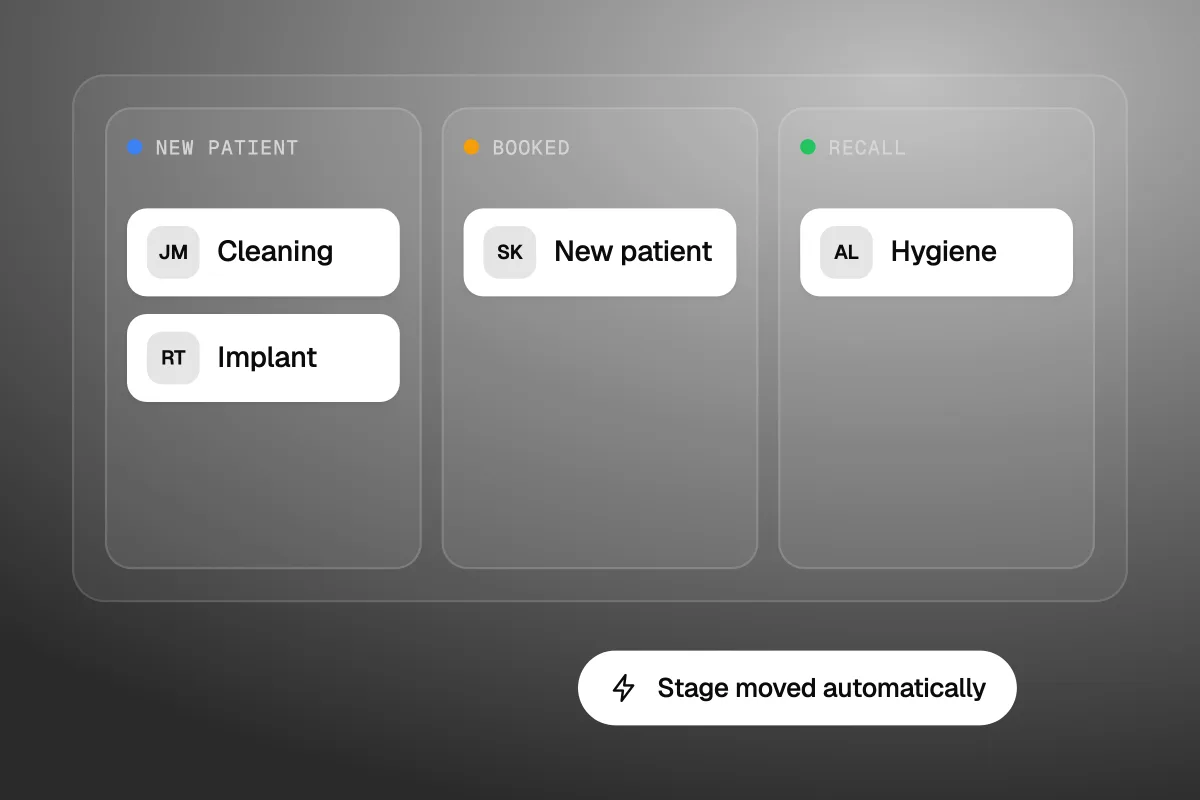
A dental CRM tracks the people your practice software can't see yet: the new patient who filled in a form but never booked, the implant consult who went quiet, and the hygiene recall that slipped past six months. Dentrix and Open Dental run the chart, the schedule and the billing. A CRM runs the chase before and between visits. Most practices don't need a second system for that. They need someone to switch on and run the follow-up they already pay for, or add one tool that does it properly.
The short answer
Practice software stores patients. A dental CRM works on leads and unbooked people: it captures new patient enquiries, follows up until they book, chases unaccepted treatment and brings back overdue recalls. If your practice software already sends recall texts that work, you may only need better lead follow-up, not a whole new platform.
What is a dental CRM?
A dental CRM (customer relationship management system) is software that tracks every person who might book with your practice, and what should happen next with each one. A patient record says what was done in the chair. A CRM record says what has not happened yet: a call not returned, a quote not accepted, a cleaning not booked.
That is why the two tools feel similar but do different jobs. Your practice management software is built around the appointment. A CRM is built around the gap before the appointment.
In practice, a dental CRM usually gives you:
- A single list of new patient leads from your website, Google, ads and phone calls.
- A pipeline, so you can see who is a new lead, who is booked and who went cold.
- Automatic texts and emails that follow up until someone books or says no.
- Lists for overdue recalls and unaccepted treatment, with campaigns to bring them back.
- Review requests after a visit.
The chart says what happened in the chair. The CRM says who still needs a call.
How is a dental CRM different from practice management software?
Practice management software runs clinical and business records for people already in your system. A dental CRM runs marketing and follow-up for people who are not booked yet. Here is the split, based on what each kind of tool is built to do:
| Job | Practice management software (Dentrix, Open Dental) | Dental CRM |
|---|---|---|
| Charting, imaging, clinical notes | Core job | Not its job |
| Schedule and chair time | Core job | Books into it, or syncs with it |
| Insurance and billing | Core job | Not its job |
| New patient enquiries from web, ads and calls | Often only once they are booked | Core job |
| Follow-up on people who have not booked | Limited | Core job |
| Unaccepted treatment (an implant consult that went quiet) | Shows on the treatment plan | Chases it with texts, emails and call tasks |
| Recall reminders | Often built in or an add-on | Campaigns for people who ignored the reminders |
| Review requests and lead source tracking | Sometimes, as an add-on | Usually built in |
The line has blurred. Dentrix's own site now talks about "automated reminders, reputation management, and patient communication tools" next to its scheduling and billing. Open Dental sells its own recall and texting add-ons (prices below). So before you buy a CRM, check what your practice software already does.
What should a dental CRM do?
A dental CRM should do four things well: catch new patient leads, follow up until they book, bring back recalls and unaccepted treatment, and ask happy patients for reviews. Anything else is a bonus.
Catch every new patient lead
New patients arrive by web form, phone call, Google Business Profile, ads and walk-ins. If each one lands in a different inbox, some get missed. A CRM pulls them into one list and alerts the front desk straight away. Calls are the leak most practices miss. If nobody picks up at lunch, that caller may just ring the next practice. A missed call text, or a proper dental answering service, closes that gap.
Follow up until they book
Someone asks about a cleaning on Tuesday night. Your team calls back Wednesday at 11am. By then they have booked somewhere else. A CRM can text them within a minute, offer a time, and keep a short follow-up going for a few days. When they book, the card moves from New patient to Booked. Nobody has to remember.
Chase unaccepted treatment
This is where the money sits. A patient comes in for an implant consult, gets a treatment plan, and goes home to think about it. Weeks later nobody has called. A CRM puts that person on a list and runs a set follow-up: a text a few days later, a call task the next week, an email that answers common worries about cost and pain. Your practice software knows the plan exists. It usually won't chase it.
Bring back the hygiene recall
Most practice software can send a reminder when a patient is due. The problem is the people who ignore it. A CRM can run a longer campaign for overdue patients: a reminder, a second message with a booking link, a call task for the front desk. The goal is a booked hygiene recall, not a sent text.
Ask for reviews
After a good visit, the CRM sends a short review request. New patients read those reviews before they call. Our list of dental marketing ideas covers how reviews feed your Google profile.
Which dental CRMs are there, and what do they cost?
Dental CRMs fall into three groups: dental communication platforms like Weave, dental lead CRMs like DenGro, and the add-ons your practice software already sells. A general CRM such as GoHighLevel is a fourth option if you want one system for ads, web forms and follow-up. Prices below come from each vendor's own page, checked 16 November 2026.
| Tool | What it is | Price shown on its page |
|---|---|---|
| Weave | Phones, texting, reminders, online scheduling, reviews, recall and payments for healthcare practices | "Starting from $199 per month". Pro, Elite and Ultimate plans are quoted on request |
| DenGro | Lead and enquiry CRM for dental practices, with email and SMS nurture | Gro £199 and Pro £249 per practice per month, inc VAT. Enterprise for groups is priced on request |
| Open Dental add-ons | Recall, confirmations, texting and online booking sold as eServices | Web Sched Recall $75, eConfirmations $25, eServices Bundle $165, all per location per month, on top of support |
| Dentrix | Practice software whose site lists reminders, review requests and marketing tools | No price on the pages we checked |
| GoHighLevel | General CRM: pipelines, texting, email, forms, calendars, reviews | Starter $97 a month, plus usage charges for texts and calls |
A few things worth knowing before you compare:
- Weave is a communications platform first. Its pricing page lists VoIP phones, appointment reminders, schedule confirmations, missed call texting, online scheduling, reviews and recall. Bulk texting comes in monthly allotments: 1,500 messages on Pro, 3,000 on Elite and 15,000 on Ultimate. You only see your full price after a sales call.
- DenGro is built for UK practices. Its pricing is in pounds, and the practice software it lists integrations with are UK systems: EXACT, Dentally, Aerona and SfD. It runs on a rolling 30-day subscription. If you run Dentrix or Open Dental in the US, ask before you book a demo.
- Open Dental users may already be halfway there. Open Dental's fees page lists US support at $199 a month per location for the first 12 months, then $149. eReminders are free for customers on support. Integrated texting is $5 a month per location plus $0.04 per US message.
- A general CRM is cheaper to start and slower to set up. GoHighLevel's Starter plan is $97 a month on its pricing page. You get the parts, but someone has to build the dental pipeline, the forms and the follow-up.
Check what your practice software already sells before you add a second system next to it.
One more cost: patient data. Before you load patient records into any tool, ask the vendor in writing how it handles HIPAA and whether it will sign a business associate agreement. None of the pricing pages above answer that for you.
Do you need a dental CRM if your practice software sends reminders?
Not always. If your practice software already sends recall reminders and confirmations, and your recall list is under control, the gap is usually new patient leads and unaccepted treatment. You can fix that without replacing anything.
Ask three questions:
- What happens to a web form at 9pm? If the answer is "someone sees it in the morning", you need faster lead follow-up.
- Who chases treatment plans that were not accepted? If nobody owns it, that is the biggest leak in most practices.
- Do you know where last month's new patients came from? If not, you can't tell which ads or listings are worth paying for.
If all three answers are fine, you don't need a CRM. Spend the money on getting more new patients instead. Our guide to Google Ads for dentists is a good place to start.
Don't buy a CRM to send reminders your practice software already sends. Buy one to chase the people who ignored them.
What is one new patient worth to your practice?
A new patient is worth far more than their first cleaning. They may come back for years, bring their family and accept bigger treatment later. That is why one lost enquiry costs more than it looks. Put your own numbers into our free customer lifetime value calculator: average spend per visit, visits per year and how long patients stay. Then compare that number with the monthly cost of the tools above. Use your own figures, not an industry average. Practices differ too much for a single number to mean anything.
How do you set up a dental CRM?
Set up a dental CRM in this order: map your stages, connect every lead source, switch on instant follow-up, then add recall, treatment and review campaigns one at a time.
- Map the stages. Keep it short: New patient, Contacted, Booked, Came in, Treatment pending, Recall due. If a stage has no action attached, cut it.
- Connect every lead source. Website forms, your Google Business Profile, ad forms and call tracking all feed one list. Tag each lead with its source.
- Switch on the first reply. A text within a minute of a form, and a missed call text for calls nobody answers. This alone fixes most lost leads.
- Link it to the schedule. When a lead books, the card should move to Booked on its own. If your CRM can't read your practice software, add a simple booking link and move cards by hand at first.
- Add treatment follow-up. For every plan over a set value, start a follow-up: text, call task, email. Stop it the moment they book.
- Add recall campaigns. Pull a list of overdue patients and run a short campaign. Start with the most overdue.
- Add reviews last. One request after the visit, one reminder. Don't nag.
The first reply matters most. Get that right before you build anything clever.
Give one person at the front desk ownership of the pipeline. A CRM that nobody checks is just a second inbox.
When is a dental CRM the wrong buy?
A dental CRM is the wrong buy if you don't have enough leads to chase. A practice that gets a handful of new patient enquiries a month can handle them with a shared inbox, a call log and a good front desk. A CRM can't make people call you.
A CRM won't create demand. It only stops you losing the demand you have.
It is also the wrong buy if nobody will run it. It happens a lot: the tool is paid for, the automations are half built, and the team goes back to sticky notes. If that sounds like your practice, fix the ownership first.
This will not suit you either if you want one vendor for everything. A CRM next to your practice software means two systems. Some practices would rather pay more for a dental platform like Weave that sits closer to the phones and the schedule.
Where does Havstock fit?
We build and run the marketing side for practices: the ads, the website, and the CRM that follows up on every lead. You keep your practice software. We set up the pipeline, the first-reply texts, the treatment follow-up and the recall campaigns, then keep them running. See what that looks like for dental practices, or see how Havstock Unlimited works. It is $4,995 USD a month, so it suits practices with real ad spend and lead volume. A single-chair practice is better off switching on its practice software's own eServices first.
If you run more than one kind of business, the same thinking applies to trades. Our HVAC CRM guide splits the field service tool from the marketing CRM in the same way.
FAQ
What is the difference between a dental CRM and practice management software?
Practice management software, like Dentrix or Open Dental, runs charting, scheduling, insurance and billing for patients already in your system. A dental CRM works on people who have not booked yet: new patient leads, unaccepted treatment and overdue recalls. It follows up with texts, emails and call tasks until they book.
Does Dentrix have a CRM?
Dentrix is practice management software, but its site now lists patient communication tools too: automated reminders, review requests, reputation management and marketing. Whether that covers your needs depends on which products you have. Ask your Dentrix rep what is included, then compare it with the lead follow-up a dental CRM offers.
How much does a dental CRM cost?
On pages checked 16 November 2026, Weave starts from $199 a month, with plans quoted on request. DenGro is £199 or £249 per practice per month including VAT. Open Dental's Web Sched Recall add-on is $75 per location per month. A general CRM like GoHighLevel starts at $97 a month plus usage.
Can a dental CRM sync with Open Dental or Dentrix?
Some can, some can't, and the depth varies. A full sync lets bookings move cards on their own. A weak one only copies contact details. Ask each vendor which practice software it connects to, what data moves each way, and how often. DenGro, for example, lists only UK systems.
Is a dental CRM HIPAA compliant?
It depends on the vendor and the plan. None of the pricing pages we checked make a HIPAA claim. Before you load patient health data into any CRM, ask the vendor in writing about HIPAA and whether it will sign a business associate agreement. Keep that answer on file.
What should a dental CRM automate first?
Start with the first reply to new patient leads: a text within a minute of a form, and a missed call text. That saves leads from day one. Next, chase unaccepted treatment plans, because that is where the biggest cases sit. Add overdue recall campaigns and review requests after that.
Do small practices need a dental CRM?
Often not. If you get a handful of enquiries a month and your front desk calls them back fast, a shared inbox and your practice software's reminders may be enough. A CRM pays off when leads come from several places and some are slipping through. Count your lost enquiries before you buy.
So, do you need a dental CRM?
Keep your practice software for the chart and the schedule. Add a dental CRM only for the jobs it can't do: answering new patient leads in minutes, chasing treatment plans and bringing back patients who ignored their recall. If your current tools already do that, you don't need another one. If they don't, a dental CRM is the cheapest fix for leads you are already paying to get.