 Nathan Field
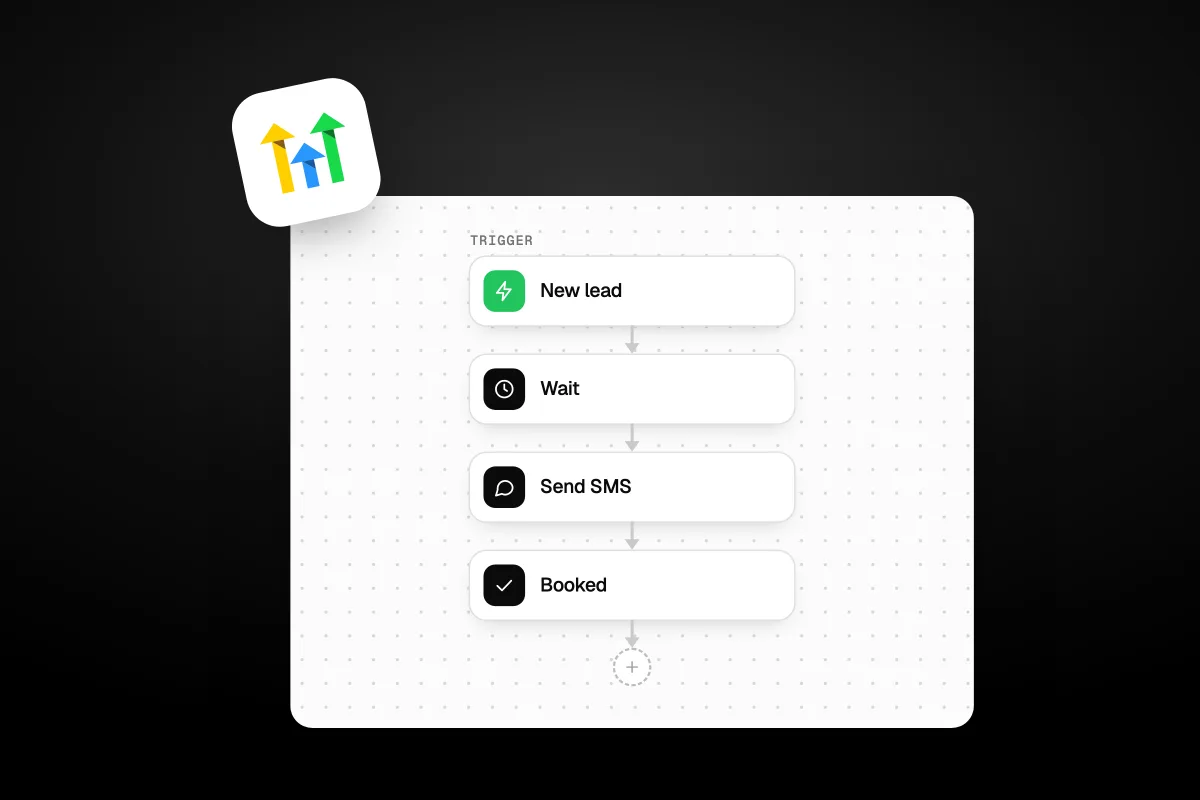
GoHighLevel workflows are the automation builder that sends texts, emails and tasks automatically when something happens, like a form fill or a missed call. A workflow has two parts: a trigger that says when it starts, and actions that say what happens next. Set it up once and it runs for every contact, day and night. This guide covers how gohighlevel workflows work, triggers versus actions, the automations worth building first, and the parts that cost extra.
The short answer
A workflow is a trigger plus a set of actions. The trigger starts it, for example a new lead or a missed call. The actions follow, like send a text, wait, then send an email. Most actions are free. Premium actions cost about $0.01 per run, plus message fees.
What are GoHighLevel workflows?
GoHighLevel workflows are automations that react to what a contact does and respond without you lifting a finger. The official help defines two parts. Triggers "define when a workflow begins", like a form being submitted or a payment received. Actions "are the steps that occur after a trigger fires", like sending an email or SMS, updating a contact, or assigning a task. You can read the basics on the GoHighLevel getting started with workflows doc.
In plain terms, a workflow is an if-this-then-that chain. If a lead fills your form, then text them in one minute, wait, then email them tomorrow. It replaces the sticky notes and the "I will follow up later" that never happens. New to the platform? Our explainer on what GoHighLevel is sets the scene. To follow along, you need an account, and our special link is the cheapest way in: start a GoHighLevel trial through our special link (we may earn a commission from this link). Our special link gives a 30-day free trial plus a free live bootcamp. Signing up on GoHighLevel's own site gives the standard 14 days with no bootcamp.
Triggers vs actions: what is the difference?
A trigger starts the workflow, and actions are what it does. Every workflow needs at least one trigger, then a chain of actions below it. Get this right and the rest is easy.
| Triggers (the when) | Actions (the what) |
|---|---|
| Form submitted | Send an email or SMS |
| Appointment booked | Wait a set time |
| Missed call | Add or remove a tag |
| Payment received | Create or update a contact |
| Tag added | Assign a task or opportunity |
| Contact replies | Send to a webhook |
One warning from the official docs: do not set up multiple workflows with the same trigger, or you can fire actions you did not mean to. Keep one clear trigger per job. You can have several triggers feed one workflow, but avoid two workflows fighting over the same event.
What workflows should you build first?
Start with the three automations that make the most money for the least effort: missed call text back, lead nurture, and booking reminders. These are the ones we build for almost every client because they plug the leaks that cost real revenue.
Missed call text back. A call comes in, nobody answers, and the workflow texts the caller within seconds. This alone saves leads that would otherwise ring the next business on the list.
Lead nurture. A new lead gets a timed series of texts and emails so you stay in front of them without manual follow-up.
Booking reminders. Before an appointment, the workflow sends reminders so fewer people no-show.
Two more pay for themselves fast. A review request workflow texts happy customers a link right after you mark a job done, so your reviews grow on autopilot. And a database reactivation workflow texts your old leads a fresh offer to wake up a list you already paid to build. The missed call text back is the one most owners start with, and we break it down in full in our guide to missed call text back. The reactivation play gets its own guide too, on database reactivation, because an old list is often the cheapest lead source you own.
Most small businesses do not lose leads because their offer is weak. They lose them because nobody followed up fast enough. A workflow never forgets and never sleeps.
Want the full build for these? Our GoHighLevel tutorial walks through setting each one up.
How do you build a workflow in GoHighLevel?
You build a workflow by picking a trigger, then adding actions in order. The builder is a vertical canvas: the trigger sits at the top, and you add each step below it with the plus button. Here is a missed call text back, start to finish.
- Open Automation, then Workflows, and create a new workflow.
- Add the trigger: Customer Replied or the missed call trigger for your setup.
- Add the first action: Send SMS, with a message like "Sorry we missed your call, how can we help?"
- Add a wait step: Wait 5 min, so a follow-up only fires if they do not reply.
- Add a branch or condition to stop the workflow if they already replied.
- Add a second action: Send SMS or an email if there is still no answer.
- Save, switch the workflow to Publish, and send a test to your own phone.
Always test with your own number before you turn it on for real leads. A wait step like Wait 5 min is what keeps automations from feeling robotic, because it spaces messages out instead of firing them all at once.
What do GoHighLevel workflows cost extra?
Most workflow actions are free, but three things add cost: premium actions, the messages themselves, and AI steps. The workflow builder is included on every plan, so the base tool costs nothing beyond your subscription. The extras are usage based.
| Item | Cost (checked 3 November 2026) |
|---|---|
| Standard workflow actions | Free |
| Premium triggers and actions | $0.01 per execution |
| Workflow Pro: Free tier | $0 per month |
| Workflow Pro: Starter | $10 per month |
| Workflow Pro: Growth | $25 per month |
| Workflow Pro: Scale | $50 per month |
| SMS sent | $0.00747 per segment, plus carrier fees |
| ChatGPT / Workflow AI actions | Billed separately |
The Workflow Pro tiers add a pool of included premium executions, so heavy users pay a flat monthly fee instead of a penny per run. ChatGPT and Workflow AI actions are billed on top of all this. For the full breakdown of plan and usage costs, see our GoHighLevel review, or the official HighLevel pricing guide. Message rates like SMS are usage fees that sit on top of any plan.
How many workflows can one account run?
There is no hard cap on how many workflows a sub-account can run. You can build a workflow for every part of your business: one for new leads, one for booked calls, one for payments, one for win-back. The limit is your own clarity, not the platform.
The real risk is a tangle. When ten workflows all touch the same contact, it gets hard to see why a text went out. Keep each workflow to one job, name them clearly, and use tags to track where a contact sits. When we audit a messy account, over-automation is the usual culprit: too many overlapping workflows, firing at cross purposes. Fewer, cleaner workflows beat a sprawling web every time.
Do you need to build workflows yourself?
No, and this is where a lot of owners get stuck. The builder is powerful, but power means a learning curve. A missed call text back is simple. A full lead nurture with branches, conditions and win-back logic takes real time to get right, and a broken workflow can text a lead at 3am or email them twice.
GoHighLevel is the tool; someone still has to build and run it. If you would rather hand that over, see how Havstock Unlimited works. We build the workflows, test them, and keep them running so you get the follow-up without touching the canvas. If you do want to learn it yourself, start small with one automation and grow from there. Our special link also gets you the free live bootcamp, which walks you through your first few workflows live.
FAQ
Are GoHighLevel workflows included in every plan?
Yes. The workflow builder comes with every GoHighLevel plan, from Starter up. You do not pay extra for the builder itself. You only pay usage costs: premium actions at about a penny per run, message fees for texts and emails, and separate charges for AI steps. The base automation is included.
What is a premium action in a workflow?
A premium action is a step GoHighLevel charges for per execution, around $0.01 each. Most standard actions, like send email, add tag or wait, are free. Premium ones tend to be heavier integrations. If you run many, the Workflow Pro tiers give a monthly pool of executions that works out cheaper than paying per run.
How much does a workflow text message cost?
SMS costs $0.00747 per segment, plus carrier fees, checked 3 November 2026. A segment is roughly 160 characters, so a long text counts as more than one. This is a usage fee on top of your plan. To text US numbers you also need A2P 10DLC registration, which carries its own one-time and monthly fees.
Can a workflow wait before sending the next message?
Yes. The Wait action pauses a workflow for a set time before the next step. A step like Wait 5 min lets you send a follow-up only if the contact has not replied yet. Wait steps are what make automations feel human, spacing messages out instead of dumping them all at once.
Why did my workflow fire twice?
Usually because two workflows share the same trigger, or a contact re-entered the same workflow. The official docs warn against multiple workflows with one trigger for exactly this reason. Check your re-entry settings and make sure only one workflow owns each event. Clean triggers stop double texts and double emails.
Can workflows send both SMS and email?
Yes. A single workflow can mix channels. You might Send SMS first, wait, then send an email, then add a tag. This is how good nurture sequences work, reaching people where they actually respond. Just mind the message fees, since SMS and email each carry their own usage cost.
What happens to a workflow if I upgrade my plan?
Your workflows keep running. Upgrading changes limits and rebilling options, not the automations you already built. If you move an account using a snapshot, the workflow structure transfers, though contacts and live data do not. Test any migrated workflow before relying on it, since connections like phone numbers do not carry over.
Built right, gohighlevel workflows are the quiet engine of a business: they answer missed calls, nurture leads and cut no-shows while you sleep. The builder is included, the costs are mostly small usage fees, and the only real danger is over-automating until nobody can tell why a message fired. If you want the results without learning the canvas, we build and run your automations under one flat Havstock Unlimited subscription. Ready to try it yourself? Spin up an account through our special link and build your first workflow this week.