 Nathan Field
The best CRM for contractors is the one that stops deals dying in the gap between the quote and the job. That gap is where contractors lose most of their money: a quote goes out, nobody follows up, and the homeowner hires whoever called back. Some contractors fix it with field-service software like Jobber or Housecall Pro. Others use a marketing CRM like GoHighLevel. Below is what a contractor CRM must do, what the main options cost on their own pages (checked 24 November 2026), and how to pick.
The short answer
If your pain is scheduling, invoicing and getting paid, start with field-service software: Housecall Pro (from $79 a month) or Jobber (from $49 a month). If your pain is leads going cold and quotes with no follow-up, add a marketing CRM like GoHighLevel (from $97 a month). Many contractors run one of each. Pick by the problem that costs you most.
Why does a contractor need a CRM?
A contractor needs a CRM because the sale has many steps and long waits, and details fall through the cracks when they live in a phone and a notepad. A homeowner asks for a quote on a kitchen remodel in March. The estimate goes out in April. They do not sign until May. Between each step, someone has to remember to follow up. Most of the time, nobody does.
Contractors lose jobs in a few predictable places:
- The first reply. Homeowners call three or four contractors. The first one who answers or calls back usually gets the site visit.
- After the estimate. The quote is sent and then silence. The owner goes with the contractor who checked in.
- Repeat and referral work. Past customers forget your name. A happy client who did a deck build last year would gladly refer you, if you asked.
A CRM fixes these by making every next step someone's job, with a date on it. Our guide to speed to lead explains why the first reply matters so much.
What should a CRM for contractors do?
A contractor CRM should do six jobs well. Everything else is a bonus.
Capture every lead in one place
Calls, website forms, Facebook leads and referrals should all land in one inbox, not scattered across a phone, an email account and sticky notes. A lead you cannot see is a lead you will not work.
Reply fast, including after hours
A missed call should trigger an instant text back so the homeowner does not move straight to the next contractor. Our post on missed call text back covers how this one automation saves jobs.
Track every deal by stage
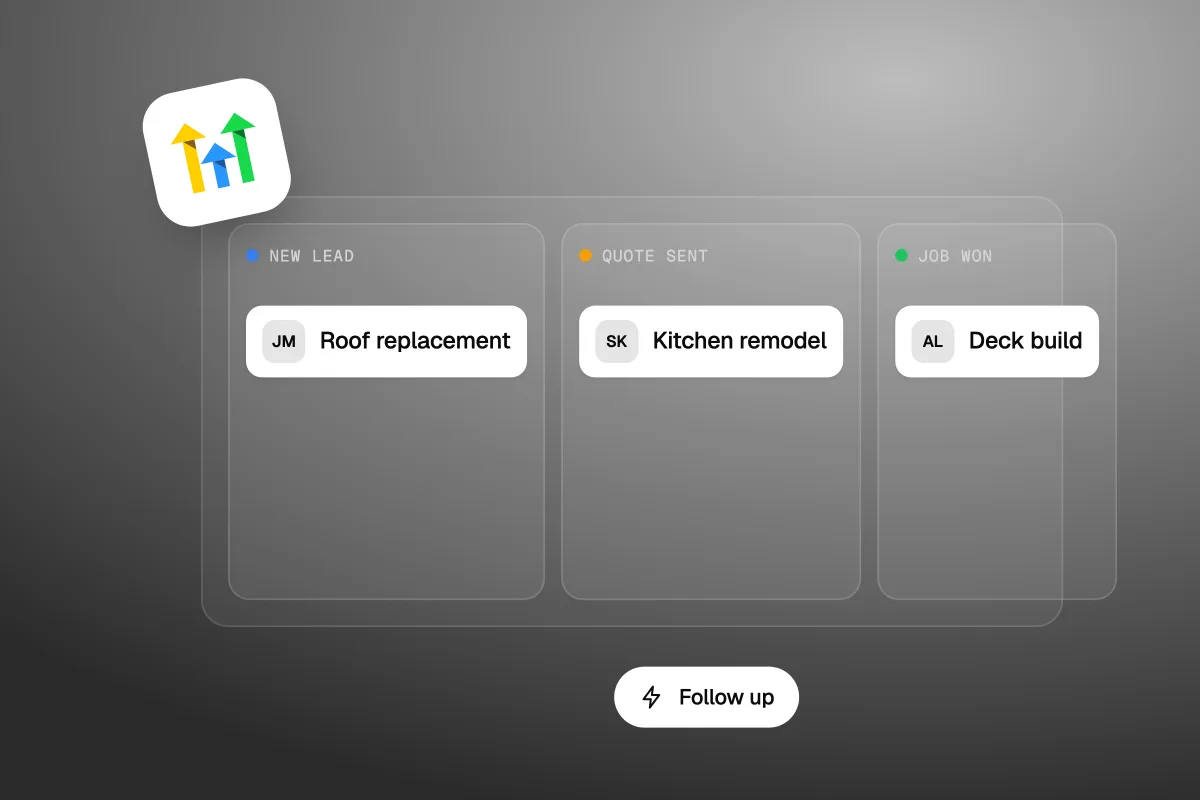
A simple pipeline with stages like New lead, Quote sent and Job won shows where each deal sits and which ones are stuck. You stop guessing and start seeing.
Follow up on quotes automatically
This is the single most valuable automation for a contractor. A text or email a few days after the estimate, then again a week later: "Any questions on the quote?" It wins back the jobs that would have gone quiet.
Schedule the work and the crew
Site visits, start dates and crew assignments in one calendar. This is where field-service tools are stronger than a general marketing CRM.
Ask for reviews and referrals
Ask for a Google review the day the job is signed off. Ask for a referral a few weeks later. A CRM can send both on a timer, so it never depends on memory.
The quote goes out and nobody follows up. The homeowner goes quiet, then signs with the contractor who checked in.
What are the two types of contractor CRM?
There are two kinds of tool that both get called a "contractor CRM", and they solve different problems.
Field-service software (Jobber, Housecall Pro, ServiceTitan) is built around the job: scheduling, dispatch, estimates, invoicing and getting paid. The customer record is there, but the focus is operations.
Marketing CRMs (GoHighLevel and similar) are built around the lead: capture, instant reply, pipelines, follow-up campaigns and reviews. The focus is turning enquiries into booked jobs.
A small remodeler who just needs to look organised and get paid wants field-service software. A contractor running ads and losing leads in follow-up wants a marketing CRM. A busy outfit often wants both, with one tool clearly owning the customer record so nothing is entered twice.
How do the main contractor CRMs compare on price?
Here are the published starting prices from each vendor's own page, checked 24 November 2026. Prices change, so check the live page before you commit.
| Tool | Starting price | Best for |
|---|---|---|
| Jobber | Core $49 a month (1 user). Connect from $139, Grow from $199, Plus from $499. Add users $29 each | Scheduling, quoting, invoicing and payments for small to mid service businesses |
| Housecall Pro | Basic $79 a month (1 user). Essentials $189 (5 users). Max $329 (8 users). Extra users $35 each | Field-service operations with strong scheduling and a mobile app |
| GoHighLevel | Starter $97 a month ($970 a year). Unlimited $297. Founder $497 | Lead capture, instant replies, pipelines and automated follow-up |
| ServiceTitan | Quote-based, no public price | Larger trades operations, usually 10 or more technicians |
Two costs hide behind the headline. First, payment processing: Jobber charges 2.9% plus 30 cents on cards and 1% on bank payments, and Housecall Pro's card rate starts at 2.59% (both checked 24 November 2026). Second, your setup time. Building pipelines, templates and follow-up messages takes days whichever tool you choose. Construction-specific tools like JobNimbus and Buildertrend exist too, but their pricing is quote-based, so we have not listed a number we cannot source.
What does the pipeline look like on a real job?
Here is one deal moving through a contractor CRM, start to finish. A homeowner fills in your website form on a Tuesday night asking about a kitchen remodel. The lead lands in the CRM as a New lead and an automatic text goes out in under a minute: "Thanks, when suits for a quick look?" They reply, and the deal moves to Site visit booked, with a reminder set for the morning before.
You visit, measure up, and send the estimate. The deal becomes Quote sent, and the CRM schedules two follow-ups: one after 3 days, one after 10. On day four the homeowner is wavering between you and another contractor. Your follow-up text lands first: "Any questions on the quote?" That nudge is often the whole difference. They sign, the deal moves to Job won, and a welcome message goes out explaining the start date and what happens next.
When the work is done, a review request fires the day the job is signed off. A few weeks later, a referral ask goes out. None of that depended on you remembering. The same shape works for a roof replacement or a deck build. The jobs differ, the pipeline does not.
The follow-up text lands first. That one nudge, sent on a timer, is often the whole difference between winning the job and losing it.
What are the hidden costs of a contractor CRM?
The sticker price is rarely the real price. Three costs catch contractors out:
- Per-user scaling. Most tools price per user. Jobber adds users at $29 each and Housecall Pro at $35 each (checked 24 November 2026). A team of six office and field staff can double the headline cost before you notice.
- Texts and calls. A marketing CRM that texts every lead has usage charges for SMS and phone. GoHighLevel bills messaging on usage on top of the plan. If you text every enquiry, budget for it.
- Setup time. Building pipelines, writing follow-up messages and connecting your lead sources takes days of real work whichever tool you pick. That time is a cost even when nobody invoices you for it.
Payment processing is the fourth. Jobber charges 2.9% plus 30 cents on cards and 1% on bank payments, and Housecall Pro's card rate starts at 2.59% (both checked 24 November 2026). On big-ticket construction invoices, that percentage adds up fast, so many contractors steer larger payments to bank transfer.
What is the best CRM for a construction business specifically?
For a construction business running bigger projects, the best CRM is one that tracks long jobs with many stages, not just quick service calls. A remodel or a build has design, permits, materials, scheduling and progress payments. General field-service tools handle service work well but can feel thin on project stages.
That is why some construction firms pair a project tool with a marketing CRM. The project tool runs the build. The marketing CRM runs the front end: capturing leads, replying fast, chasing quotes and asking for referrals. If you run ads or buy leads, the front end is usually where the money leaks, so that is where a CRM pays for itself first.
When does GoHighLevel make sense for a contractor?
GoHighLevel makes sense for a contractor when you have enough leads but lose them in follow-up. It can text every new lead within a minute, book site visits into a calendar, move each deal through a pipeline, chase quotes that go quiet, and ask for reviews and referrals after the job. Our GoHighLevel workflows guide shows how those automations are built, and what GoHighLevel is covers the basics.
What it does not do is site scheduling, crew dispatch and progress invoicing as well as a dedicated field-service tool. Most contractors who use GoHighLevel pair it with Jobber or Housecall Pro for the operations side.
To try it on your own leads, our special link gets you a 30-day free trial of GoHighLevel (we may earn a commission from this link) plus a free live bootcamp. Sign up on GoHighLevel's own site and you get the standard 14 days, with no bootcamp.
Which contractor CRM fits which situation?
The right pick depends on your size and your main problem. Here is how we would decide.
| Your situation | What to use |
|---|---|
| One or two crews, mostly service calls, need to look organised and get paid | Field-service software like Jobber or Housecall Pro |
| Running ads or buying leads, enquiries going cold, quotes with no follow-up | A marketing CRM like GoHighLevel for the front end |
| Busy outfit, many jobs in flight, both operations and follow-up hurting | A field-service tool plus a marketing CRM, with one owning the customer record |
| Large trades operation, 10 or more technicians, heavy dispatch | A platform like ServiceTitan (quote-based), often with a marketing CRM alongside |
Where is a CRM the wrong choice for a contractor?
A CRM is the wrong first spend if you have no lead problem and no follow-up problem. If every job comes from word of mouth, your calendar is full, and you already ask for reviews and referrals by habit, a new tool will not add much. Spend the money on the actual bottleneck instead, whether that is a second crew or better materials buying.
It is also the wrong move if nobody will own it. A CRM only works when one person keeps it updated. If you buy it and leave it, you have paid for a contact list you could have kept in a spreadsheet. Honestly, a lot of one-crew contractors are better served by a cheap scheduling tool and a reminder to call back every quote, than by a full marketing CRM they never set up.
How do you set up a contractor CRM pipeline?
Set up a pipeline with stages that match how your jobs really move. Keep it short. A simple version:
- New lead: instant text or call back, offer site visit times.
- Site visit booked: reminder the day before.
- Quote sent: follow up after 3 days and after 10 days.
- Job won: welcome message and what happens next.
- Scheduled: start date and crew confirmed.
- Complete: review request the day it is signed off.
- Referral: a few weeks later, ask who else needs work done.
Whether the job is a roof replacement, a kitchen remodel or a deck build, the stages are the same. A pipeline with 20 stages is one nobody updates. For more lead-side detail, our roofing leads guide and roofing CRM guide show the same setup in a specific trade, and our HVAC CRM guide covers it for service work.
Who should run the contractor CRM?
One named person should own it, usually the owner at first, then the office manager as you grow. They check stuck deals every week, make sure every lead gets a reply, and fix the follow-up messages when replies drop off. A CRM nobody owns turns into an expensive list of names. The tool does not run itself, and it does not win jobs on its own. It just makes sure no lead is forgotten.
FAQ
What is the best CRM for contractors?
It depends on your main problem. For scheduling, quoting and payments, field-service software like Jobber or Housecall Pro is built for it. For lead follow-up, pipelines and reviews, a marketing CRM like GoHighLevel fits. Many contractors use one of each, with one tool owning the customer record.
How much does a CRM for contractors cost?
On the pages we checked on 24 November 2026, Jobber starts at $49 a month, Housecall Pro at $79, and GoHighLevel at $97. ServiceTitan is quote-based with no public price. Add payment processing fees and your own setup time to any headline figure.
Is there a free CRM for contractors?
Some general CRMs offer free tiers, but they rarely handle quotes, scheduling and follow-up the way a contractor needs. The trades tools above use free trials instead of free plans: Housecall Pro and GoHighLevel both list a trial, so you can test the fit before paying.
Do I need a CRM if I only get word-of-mouth work?
If every job comes from referrals and you never lose one, you may not need much. But even referral businesses leak money by forgetting to ask for the next referral or review. A CRM that automates those two asks often pays for itself without any ad spend.
Can GoHighLevel replace Jobber or Housecall Pro?
For the marketing side, yes: lead capture, instant replies, pipelines, quote follow-up and review requests. For crew scheduling, dispatch and field invoicing, no, a dedicated field-service tool does those better. Most contractors who run ads pair GoHighLevel with one of them.
How long does it take to set up a contractor CRM?
Expect a few days of real work: importing contacts, building the pipeline stages, writing the follow-up messages and connecting your lead sources. The tool is quick to switch on. The thinking behind your pipeline and your messages is what takes the time, and it is what makes the CRM actually win jobs.
What is the difference between a CRM and field-service software?
Field-service software is built around the job: scheduling, dispatch, estimates and invoicing. A marketing CRM is built around the lead: capture, instant replies, pipelines and follow-up. Jobber and Housecall Pro lean to the first, GoHighLevel to the second. Many contractors run both because they solve different problems.
Can one CRM handle residential and commercial work?
Yes, if you give each its own pipeline. Residential jobs move fast and lean on reviews and referrals. Commercial work has longer stages, bids and more approvals. Keep them as separate pipelines in the same tool so the stages and follow-up messages match how each type of job really moves.
So, which CRM should a contractor use?
Pick your contractor CRM by the problem that costs you most. If you are drowning in scheduling and invoicing, start with Jobber or Housecall Pro. If leads go cold and quotes get no follow-up, add a marketing CRM like GoHighLevel and turn on the instant reply and the quote follow-up first. Those two win the most jobs back.
GoHighLevel is the tool. Someone still has to build the pipelines, write the messages and keep it running. If you would rather hand that part over, see how Havstock Unlimited works. We build and run follow-up, campaigns and pipelines as part of our CRM and automations service, and we focus on trades through our contractor marketing work. At $4,995 USD a month it suits contractors already spending on ads with jobs coming in. A one-crew operation will do better starting with a $49 tool and a weekend of setup.